The Meta Ads MCP: What It Can and Can't Do (2026)
Meta's Ads MCP is the official AI connector for your ad account: a hosted endpoint you paste into Claude, 29 tools, free, and — unlike Google's — no developer app required. It reads and writes. It will pull your campaign data, diagnose creative fatigue and build a campaign from a conversation. What it will not do is show you which audience a campaign is targeting, validate the location ID it uses, or verify that its own changes actually landed. It is a very good analyst. It is not a manager.
This is the honest version of that list — what works, what is still manual, and the limits that appear in no documentation, because we hit all of them on camera.
What is the Meta Ads MCP?
On 29 April 2026, Meta shipped what it calls AI connectors: an official Model Context Protocol server at mcp.facebook.com/ads, plus a CLI. The headline is what's absent from the setup. No developer app. No API token. No app review. No code.
You add the URL as a connector in Claude, log in with your Business Manager account, and you are done. It takes about two minutes. The old path — register a developer app, request permissions, wait for review — took twenty-five minutes on a good day and stopped most marketers before they started.
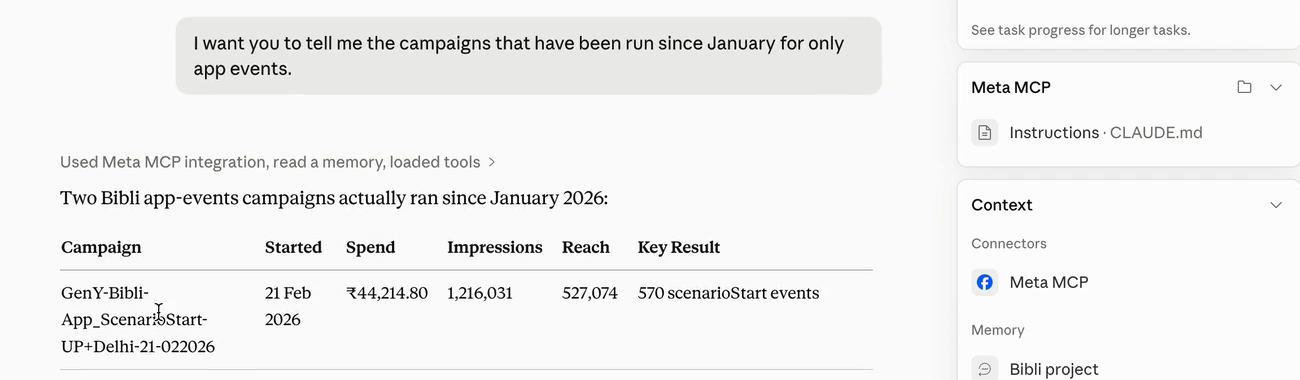
That is the actual unlock. Not the AI. The removal of the developer gate.
Official connector vs community MCPs
Several community Meta Ads MCP servers existed before Meta shipped its own, and they still exist. Some are well-maintained and add capabilities the official server lacks. But the official connector is now the sane default for one reason: it is authenticated by Meta, against your Business Manager, with no third party holding a token to your ad account.
If you are evaluating a community MCP anyway, the vetting rules are unglamorous and reliable: check the repo's forks and community reviews, and check usage. High usage implies safety by numbers. Very few users is a danger signal — you are trusting a stranger's code with spend authority.
What the Meta Ads MCP can do
Analysis — the part that genuinely works
Analysis is where the MCP earns its place, and it is not close. You ask a question in plain English and it queries the account: spend by campaign, cost per result by ad set, creative fatigue signals, delivery patterns across placements. The value is not that it can access data you couldn't reach — you could always reach it. The value is that the ten minutes of clicking, filtering and exporting collapses into a sentence.
The important nuance: you can ask questions the dashboard structurally cannot answer. Ads Manager gives you cost per lead by ad set, because ad sets are the object it knows. Ask the MCP for cost per lead by audience across a naming convention you invented, and it will assemble it. The dashboard has objects. The MCP has your question.
If you want to see that end to end rather than described, we walked through a full account audit with it — the prompts, the pushback, and the bits where it was wrong — in an honest Claude + MCP walkthrough.
Push that further and you stop asking questions one at a time. Give it a rubric — what counts as fatigue, at what frequency, with what deltas — and it will build you a standing view of the account against your thresholds rather than Meta's:
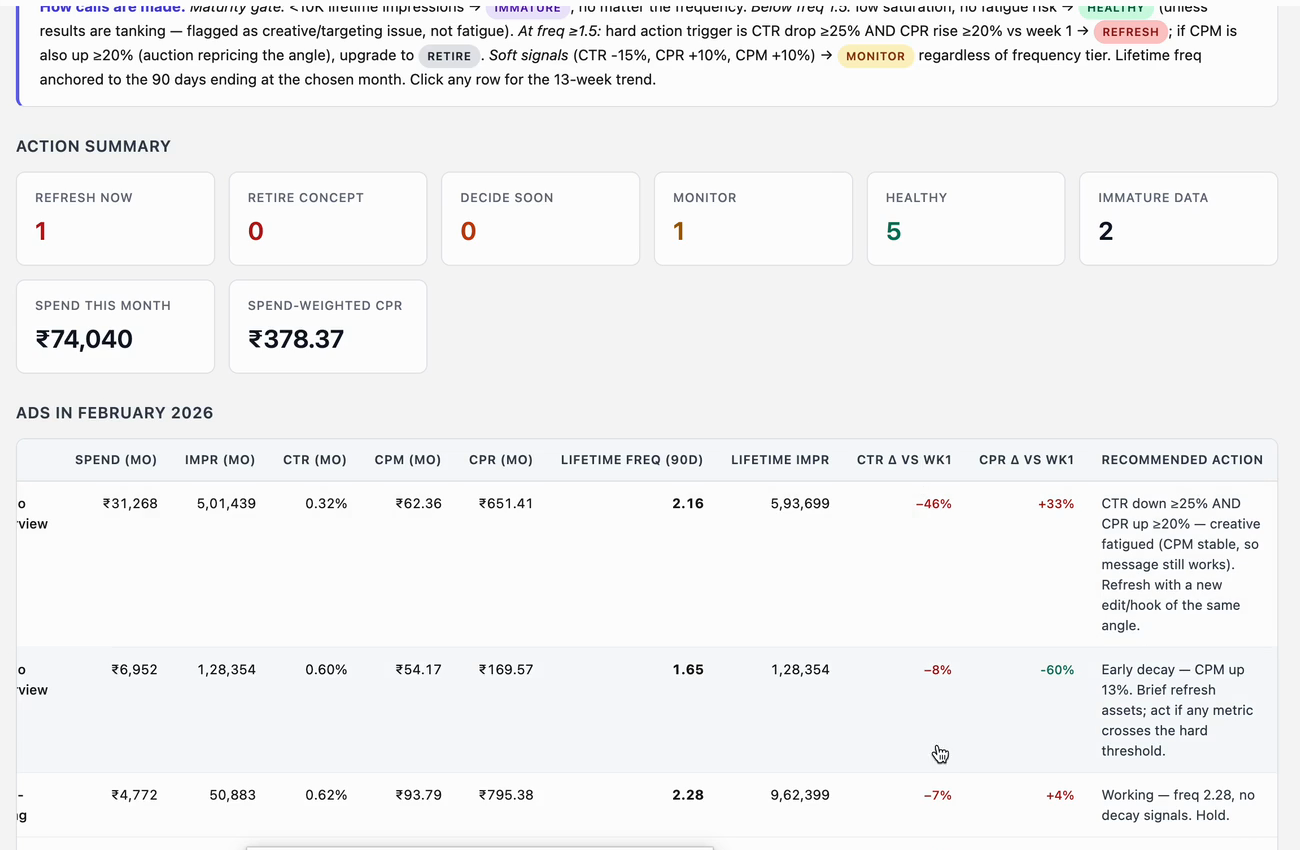
That distinction is the whole article in one image. The connector pulled the numbers. The judgement about what a frequency of 2.16 with CTR down 46% actually means — that came from a marketer, and it had to be written down before the model could apply it.
Campaign creation — semi-manual, but real
It creates campaigns. We built one live, start to finish, in a conversation. Checked in Ads Manager afterwards, it got all of this right without being told twice:
- The conversion event
- The ad set name
- The conversion location
- The maximize-conversions bid strategy
- The daily budget
- Advantage+ switched off, as instructed
That is a functioning campaign. As we said at the time: it is at least doing a basic job of getting the ads created. The caveat is the word basic — and the next section is why.
What the Meta Ads MCP can't do (the limits, as of July 2026)
This is the section nobody publishes, because you only find these by building on it.
It does not expose your targeting
The single most surprising limit. The MCP can pull campaign names, spend, results and creative performance — but it cannot tell you which audience a campaign is actually targeting. Ask it what targeting a campaign used and it will tell you it doesn't have that field.
For an analyst, that is a serious hole. Half of Meta performance analysis is "which audience is working" and the connector cannot see the answer.
There are two workarounds, and both are yours to build, not Meta's to fix. Encode your targeting in your campaign naming convention, so the name carries what the field won't. Or drop your media plan into the project as a document, so the model can join plan to performance itself.
It can read your media library, but it can't put anything in it
This one has moved recently, and the current position is narrower than most write-ups claim. The MCP can read your Business Manager media library — it will pull image names and their hash IDs itself, and use them to build the ad. You do not have to go hunting for a hash any more.
What it cannot do is get new media into the library. The image has to exist there already. So the workflow is: upload your creative to the media library manually, or hand the MCP a URL to the media, and it takes it from there.
That is a much smaller gap than it was even a few weeks ago, and it is worth checking again by the time you read this. Meta is shipping to this surface fast — capabilities that were missing when we first tested have quietly appeared since.
It can't verify its own writes
This is the one that should change how you work. In its own words during a live build: it is not able to verify if the targeting we mentioned will be updated properly.
Read that carefully. It will make a change. It will report success. It cannot confirm the change is what you asked for. A "done" from the MCP is a statement about the API call, not about your campaign.
It has no geo or interest search
The MCP will ask you for location and interest IDs, and it has no tool to look them up or validate them. It cannot check its own inputs.
This compounds badly with the previous limit, and it is how you end up targeting the wrong country while every signal says fine. Meta's location key is not a GeoNames ID — the GeoNames IDs for major Indian cities resolve to villages in South Korea inside Meta's system. Pass a wrong key that happens to land somewhere populous and the ad set validates, delivers, and spends.
| Capability | Does it work? | The workaround |
|---|---|---|
| Pull performance data | Yes | — |
| Diagnose creative fatigue | Yes, with your thresholds | Supply your own benchmarks |
| Create a campaign | Mostly | — |
| Read which audience is targeted | No | Naming convention, or a plan doc |
| Read your media library (names + hash IDs) | Yes | — |
| Upload new creative to the library | No | Upload it manually, or give it a URL |
| Verify its own changes | No | Check Ads Manager yourself |
| Look up or validate a location ID | No | Validate against the Graph API |
Where it gets things wrong, and how to catch it
It needs a precise location ID — and cannot check the one it uses
This is the sharpest edge on the whole surface, and it follows directly from the two limits above: it needs an ID it cannot look up, and it cannot verify what it wrote.
Meta's location key is not a GeoNames ID, which is the reasonable assumption almost everyone makes. Feed it a GeoNames ID for a major Indian city and Meta resolves it to a village in South Korea. We asked for Delhi NCR on a live build and the ad set came back targeting Egypt.
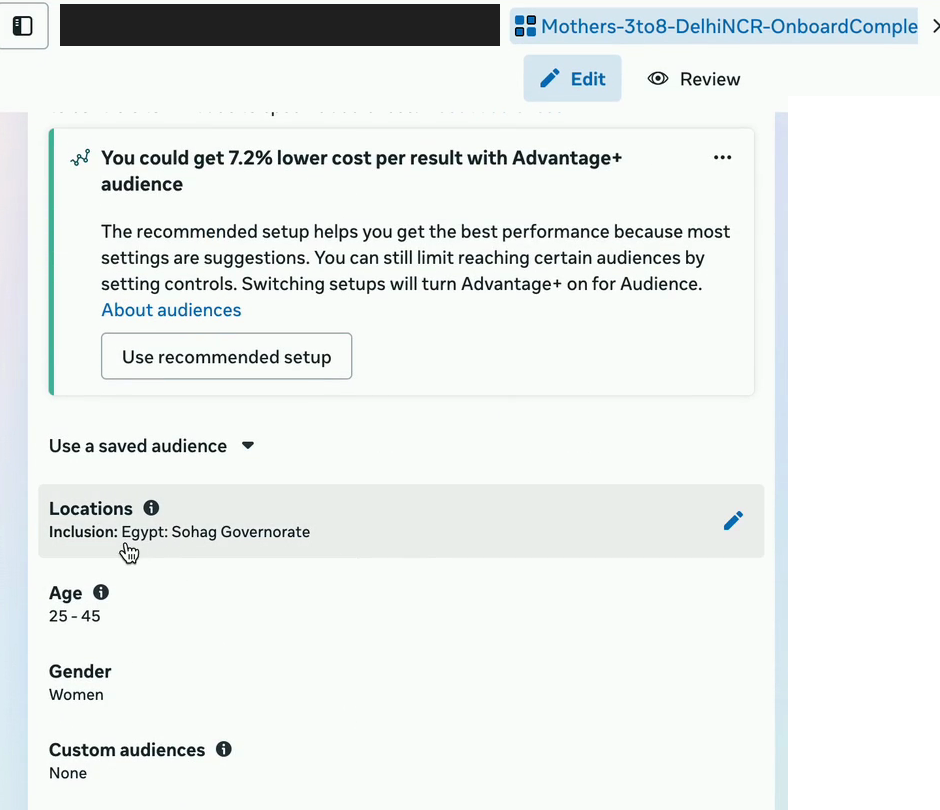
DelhiNCR. Ads Manager shows the location the MCP actually wrote: Egypt: Sohag Governorate. Nothing errored.Here is the part that should worry you. A wrong key does not necessarily fail. If it happens to land somewhere populous, the ad set validates, passes Meta's own audience-size checks, delivers, and spends. Every signal in the chain says fine. The only thing that is wrong is who is seeing your ad.
So: pass verified location IDs, and confirm them out-of-band before you trust them. Fixing the Delhi case took three rounds — correcting it in Ads Manager, showing the MCP the corrected structure, and a retry that silently did nothing before the second attempt landed.
Advantage+ defaults on without asking
Creating a new ad set, the MCP enabled Advantage+ Audience by default and reported it as normal behaviour — age and gender become suggestions rather than hard limits.
For plenty of accounts that is fine. For others it is unacceptable: we have run healthcare campaigns where an age exclusion was a clinical requirement, not a preference, and Meta's automation will serve outside your guardrails when it finds cheap inventory there.
If it matters, say so explicitly in the prompt — switch off both Advantage+ audience and placements — then confirm it in Ads Manager.
Always verify targeting after a push
This is the one rule to take from this article. After any change the MCP makes, open Ads Manager and look at the targeting. Not the campaign. The targeting.
It is where all three limits converge: the MCP cannot read the targeting field back, cannot validate the location ID it used, and cannot confirm its own write landed. Three separate blind spots, all pointing at the same object. A "done" from the MCP tells you an API call succeeded — nothing more.
It takes fifteen seconds and it is the difference between a campaign that runs and a campaign that spends a week in the wrong country.
Who the Meta Ads MCP is actually for
It is for the marketer who wants their questions answered in seconds instead of ten minutes of clicking, and who will still open Ads Manager to check the result.
You don't need Claude Code
A persistent myth is that this requires a terminal. It does not. For Meta ads work, Claude's desktop app is enough — the connector, the analysis, the dashboards, the campaign builds, all of it. You only need the developer-flavoured tooling when a workflow needs local execution: hosting something, running video encoding, wiring a custom API bridge.
Managing ads is not that. If you have been putting this off because you assumed it needed engineering, it doesn't.
The honest summary: the MCP is a very fast analyst with no memory of your account's history, no view of your targeting, and no ability to check its own work. Give it a framework and it is genuinely excellent. Ask it an open question about a blank account and it will confidently invent a plausible story.
The connector is the commodity. The judgement you bring — the thresholds, the naming conventions, the questions worth asking — is the part that isn't.
We audit Meta accounts for exactly this class of gap — the targeting you can't see, the changes that reported success but didn't land, the budget quietly leaking into placements nobody chose. See how the Meta Ads audit works.
FAQ
What can the Meta Ads MCP actually do?
It reads and writes your Meta ad account conversationally: pulling performance data, diagnosing creative fatigue, and creating campaigns. It can also read your media library, including image names and hash IDs. What it cannot do is show you which audience a campaign targets, upload new creative to the media library, validate a location ID, or verify that its own changes actually landed.
Can Claude launch Facebook ads for me?
Yes. Claude builds the campaign, ad set and ad through the Meta Ads MCP and gets the conversion event, bid strategy and budget right unprompted. It can pull creative from your media library itself. The one manual step is getting the image into that library in the first place — upload it yourself, or give Claude a URL to the media. Always check the targeting in Ads Manager afterwards, because the MCP cannot verify its own changes.
Why can't Claude see my Meta ad targeting?
Because the Meta Ads MCP does not expose the targeting field. It can read campaign names, spend, results and creative performance, but not the audience a campaign is actually targeting. The workarounds are to encode targeting in your campaign naming convention, or to add your media plan to the project so Claude can join plan to performance itself.
Do I need to code to use the Meta Ads MCP?
No. For Meta ads work, Claude's desktop app is enough — you add mcp.facebook.com/ads as a connector and log in with your Business Manager account, which takes about two minutes. You only need developer tooling when a workflow requires local execution, such as hosting a server or running video encoding. Managing ads is not that.
Is the Meta Ads MCP free?
Yes. Meta's official AI connectors, launched on 29 April 2026, are free and require no developer app, no API token and no app review. You need a Meta Business Manager account and an MCP-compatible client such as Claude.
