The Google Ads MCP: What It Can and Can't Do (2026)
Google ships an official Google Ads MCP server. It connects Claude — or any MCP client — to the Google Ads API, so you can query your account in plain English instead of building reports. It is read-only in the current release, and there is no hosted URL: Google publishes the code and you run it yourself.
That second part is the whole job. Meta hands you a link; Google hands you a repository. So this is mostly a practical guide to getting it working, and an honest account of what it does once it is.
Where to get it
Two links, both official, both worth reading before you start:
- The docs — Google Ads MCP server: Developer integration guide. Google's own page. It includes the Cloud Run deployment path.
- The code — github.com/googleads/google-ads-mcp. This is what you deploy.
The key specifications are worth a screenshot, because they answer most of the questions people ask before they ask them:
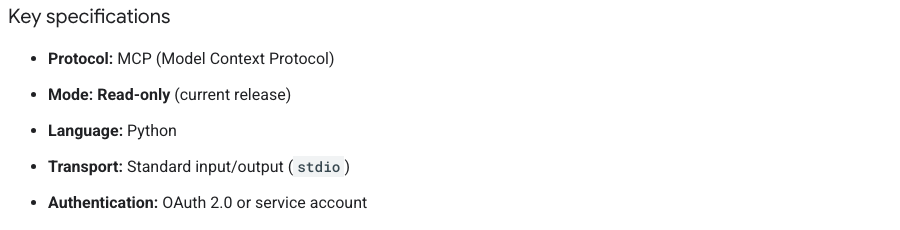
The server is Python, speaks over stdio, and authenticates with OAuth 2.0 or a service account. It exposes three tools: list_accessible_customers (which accounts can this token see), search (run a GAQL query — this is the one that does the work), and get_resource_metadata (what fields exist, so the model writes valid GAQL instead of guessing).
How to make it functional
Five steps. None are hard; there are just more of them than Meta asks for.
- Enable the APIs on a Google Cloud project — the Google Ads API itself, plus whatever your hosting needs (for a container deployment: Cloud Run, Artifact Registry, Cloud Build, Secret Manager).
- Set up an OAuth consent screen and create a Web OAuth Client ID. Add yourself as a test user. You will also need a Google Ads developer token, and that token must come from a manager (MCC) account — see below.
- Clone the open-source server from github.com/googleads/google-ads-mcp.
- Build the container and deploy it somewhere you control. Google's docs walk through Cloud Run, and that is what we used — but there is nothing special about Cloud Run here. Any service that will run a container behind a stable HTTPS URL works: another cloud's container service, a small VPS, your own infrastructure. The requirement is a URL, not a vendor.
- Add that URL as a custom connector in Claude. Authenticate once. Done.
If you have deployed a container before, this is an afternoon. If you haven't, this is the wall — and it is worth being honest that this is where most marketers stop. Meta asks none of it.
What you get once it's running
The MCP is at its best on questions that are tedious rather than hard. Cost per conversion by week. Impression share against budget. Which keywords sit at quality score 1 and what they cost you. Search terms nobody has read since launch.
All of that was already in your account. What changes is the cost of asking. A report that took twenty minutes of exporting and pivoting arrives in a sentence — which means you ask ten questions instead of one, and question ten is usually where the finding is.
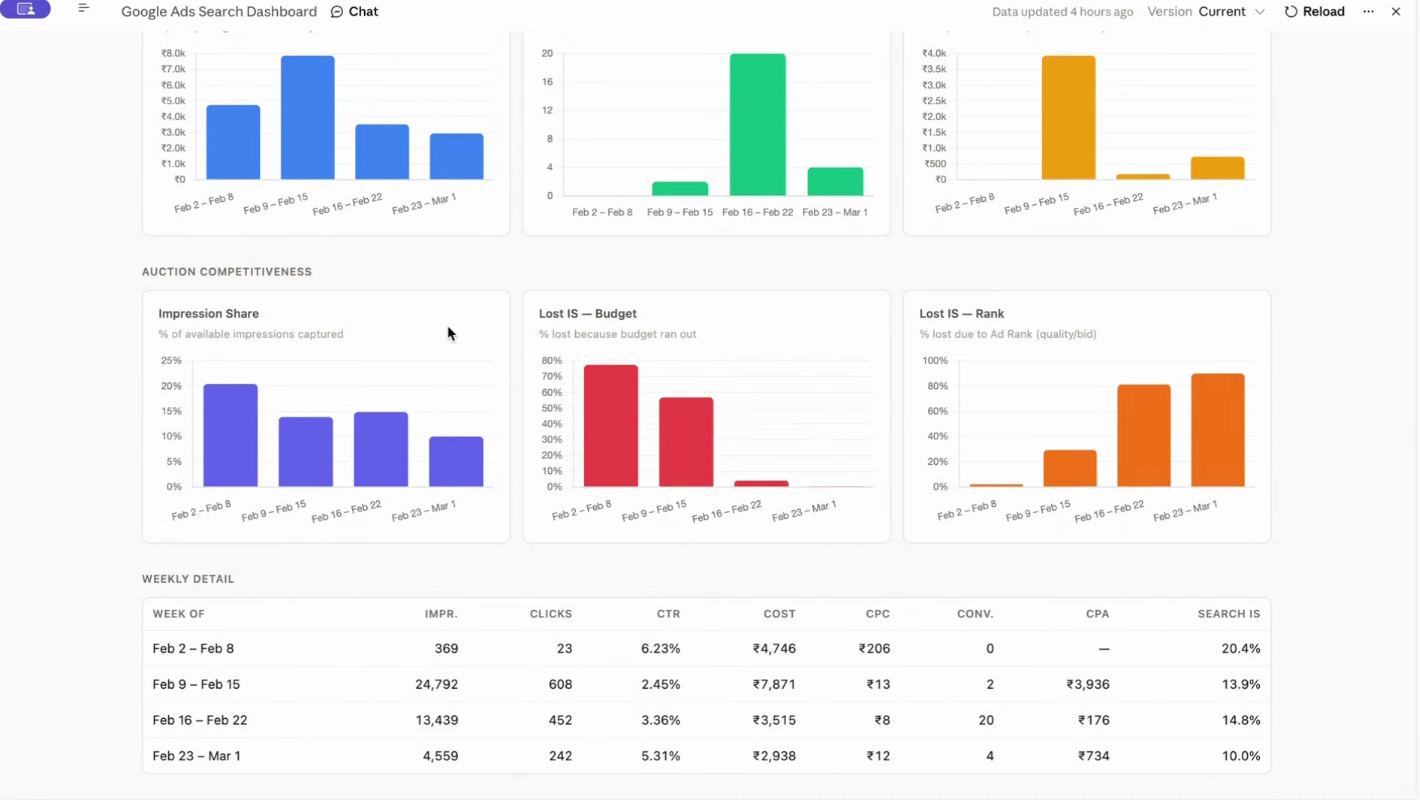
Impression share is the example worth dwelling on. It tells you what share of available impressions you actually captured — your headroom. Then it splits: how much you lost because the budget ran out, versus how much you lost to Ad Rank. The first is a decision about money. The second is a problem with your ads and landing pages. Same headline number, two completely different jobs — and the split is exactly the kind of thing that is three clicks deep in the UI and one sentence away in a conversation.
The pattern that works: give it a framework and let it fill it in. Asked a structured question about a quality score problem, it produced a genuinely useful answer — fix landing page experience first, since it was red across every keyword; audit the page's web vitals; match the ad headline to the landing page; reactivate the campaign so unscored keywords get scored; pause or rewrite the keywords sitting at 1. Asked "what's wrong with this account?" cold, the same model produces a plausible story with confident wrong details in it. The framework is not decoration. It is what makes the output true.
What it can't do
It can't change anything
Read-only means read-only: no creating campaigns, no pausing ads, no bid adjustments. It will tell you what to change; you make the change. Google's docs say "current release", so this may not be permanent — but plan for today's scope, not next year's.
It can't show you the PMax search terms Google hides
This is the question we get most, and the answer disappoints every time.
Performance Max withholds search-term data, so the hope is reasonable: if Google built the MCP, maybe Google's own tooling sees more? No. The MCP can only reach what the Google Ads API exposes, and the API exposes what your dashboard exposes. As we put it on a live session: it does not have any hidden access to something which is not available to you. If a tool promises you hidden PMax data through the API, be suspicious of the tool.
You need an MCC account, and your token has a tier
You cannot mint a Google Ads API token from a plain ad account — you need a manager (MCC) account. If your ad account sits under someone else's manager, an agency's for instance, you must pass that manager account ID with your requests. Get it wrong and you get an unhelpful "can't find your account" rather than an explanation.
The token then has an access tier, and this catches people out. A new developer token starts at explorer level, which is rate-limited hard. You graduate to basic, then standard, as Google observes clean usage. On a small token, tell the model not to refresh data every turn — ours pulls fresh numbers only when asked, otherwise a chatty session burns the quota before it reaches anything useful.
| Capability | Does it work? |
|---|---|
| Query any account data via GAQL | Yes |
| Audit, diagnose, recommend | Yes — with your framework |
| See PMax search terms Google hides | No — same visibility as your dashboard |
| Create or modify anything | No — read-only in the current release |
| Work without an MCC account | No — needed for the developer token |
| Connect without hosting anything | No — you deploy the repo |
If you need write access
Three real options, in the order we would try them.
Let it draft, you execute. The model writes the negative keyword list, the restructure, the new ad copy. You paste it in. Unglamorous, no setup, and it covers most of what people actually want — the analysis was always the expensive part; the clicking never was.
Call the Google Ads API directly. This works, but there is a gate: Google runs an approval process for write access and you submit a document explaining what you are building. Not a formality, not instant.
Use a community MCP with write capability. They exist. Before you hand one a token to an account that spends real money, read the repository the way you would vet a contractor — forks, community reviews, usage. High usage implies safety by numbers. Almost no users is a danger signal.
Worth noting where the market actually sits: every operator we work with — agencies, in-house teams, founders — independently draws the same line. Automate the analysis, keep hands on the wheel. Nobody is asking for an AI that changes their bids at 2am. If read-only feels like a blocker, it is worth checking whether the thing you want is really write access, or just a faster answer.
We run Google Ads audits on exactly this stack — the official MCP, a documented framework, and a human deciding what ships. See how the Google Ads audit works.
FAQ
Is there an MCP for Google Ads and what does it do?
Yes. Google publishes an official Google Ads MCP server that connects an AI client such as Claude to the Google Ads API. It exposes three tools — list_accessible_customers, search (which runs GAQL queries), and get_resource_metadata — and it is strictly read-only, so it can audit and analyse your account but cannot change anything in it.
Can I use Claude to change my Google Ads campaigns?
Not through Google's official MCP. It is read-only by design and cannot create campaigns, pause ads, or adjust bids. To write, you call the Google Ads API directly and go through Google's approval process, or use a community MCP with write access. A third option many teams prefer: let Claude draft the changes and apply them yourself.
Why is there no Google Ads connector for Claude?
Google publishes the MCP as a GitHub repository rather than a hosted endpoint, so there is no URL to paste. You deploy it yourself — locally via pipx, or self-hosted on Cloud Run or Docker — and connect your own deployment. Meta, by contrast, hosts its connector at mcp.facebook.com/ads. You will also need a Google Cloud project, a developer token and OAuth credentials.
Do I need a manager account for the Google Ads MCP?
Yes. You cannot generate a Google Ads API token from a plain ad account — you need a manager (MCC) account. If your ad account sits under someone else's manager, such as an agency's, you must also pass that manager account ID with your requests, otherwise the MCP will simply fail to find your account.
Can AI pull the search terms Google hides in PMax?
No. The Google Ads MCP can only see what the Google Ads API exposes, which is the same data available in your dashboard. It has no hidden access to anything Performance Max withholds from you. What changes is the effort of asking, not the visibility.
