Do You Need an MCC / Manager Account to Use the Google Ads MCP?
Do you need a manager account for the Google Ads MCP?
Yes — but not for the reason most guides give. You need a manager (MCC) account to obtain a developer token, and that token is what lets any application call the Google Ads API at all. It is not what grants access to your ad accounts. That comes from your own Google login. The Google Ads MCP MCC requirement is about reaching the API, not about reaching your data.
Get those two straight and most of the setup confusion disappears — including the question people get wrong most often, which is whether every account has to sit under one manager before Claude can read it. It doesn't.
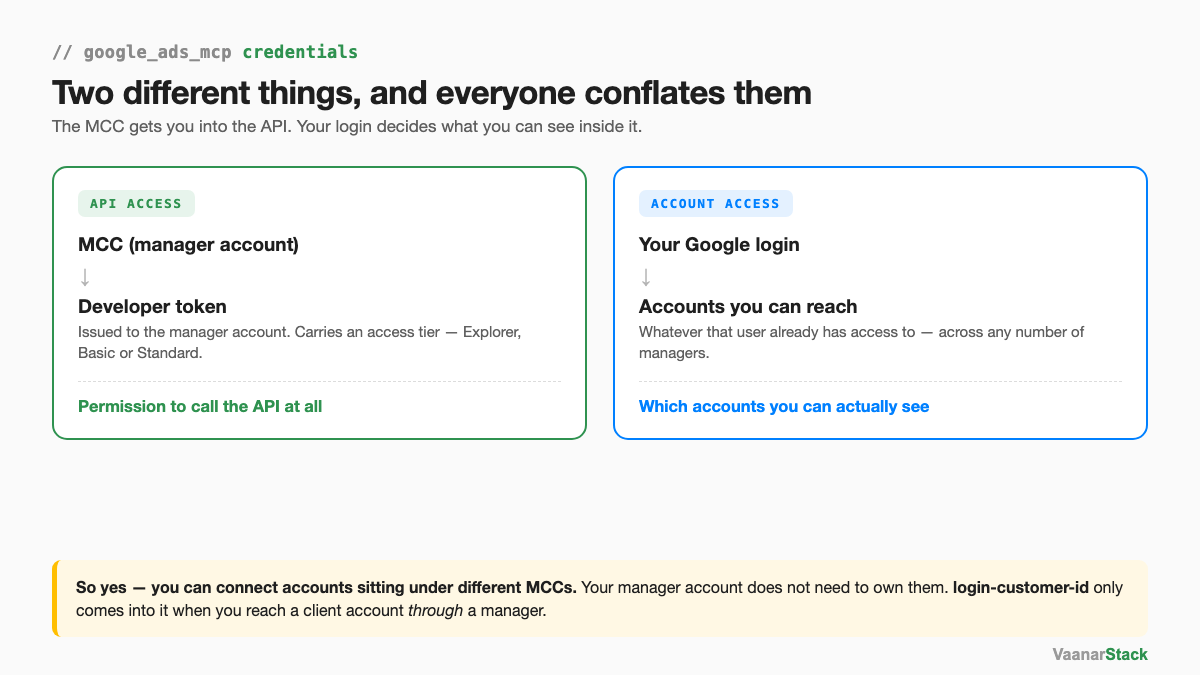
The distinction that trips everyone up
The developer token is permission to use the API
Google issues developer tokens to manager accounts, not to ordinary ad accounts. That is the entire reason an MCC appears in every setup guide. Without one there is no token, and without a token the MCP has nothing to authenticate with — it cannot make a single call, regardless of what you have access to in the Google Ads interface.
The token also carries an access tier, and this is the part that bites later rather than during setup. In our own Google Ads MCP build we were working on Explorer-level access, and the assistant flagged the daily operations cap unprompted — then restructured the dashboard so it only called the API on a manual refresh instead of firing five calls every time the artifact opened.
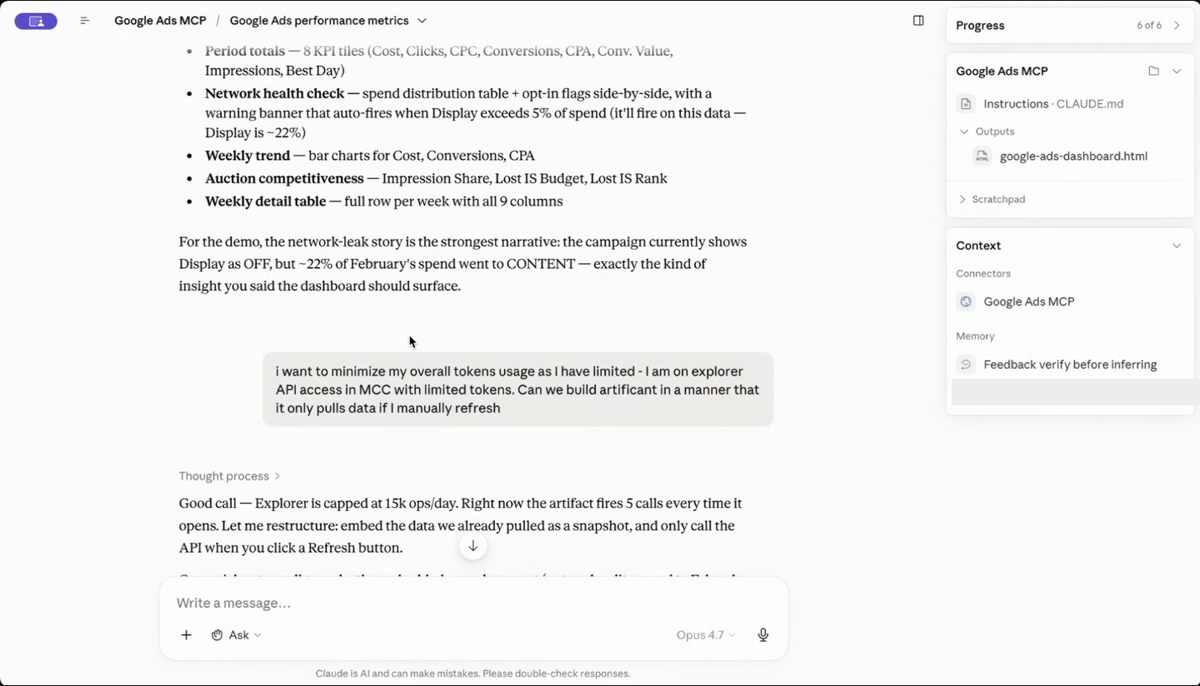
That is the practical shape of a token tier: it does not stop you connecting, it caps how much you can ask for. Worth knowing before you build something that polls.
Your Google login decides which accounts you can see
Account visibility is a completely separate mechanism. When you authorise the MCP, you authorise it as a specific Google user. Whatever accounts that user can already open in the Google Ads interface are the accounts the MCP can query. Nothing about the developer token widens or narrows that list.
This is why the two get conflated. Both are prerequisites, both appear in the same setup flow, and both produce errors when missing — but they fail for different reasons and the fixes are unrelated.
| Credential | What it authorises | What breaks without it |
|---|---|---|
| Developer token (from an MCC) | Calling the Google Ads API at all | Every call fails at authentication — no account is reachable |
| Your Google login (OAuth) | Which specific accounts you can read | Calls succeed, but the accounts you expect are missing from the list |
Can you connect accounts from different MCCs?
Yes — as long as your Google user has access to them
One developer token can serve accounts sitting under any number of different manager accounts. The token establishes that you may use the API; your login establishes which accounts you may use it on. If your Google user has access to a client's account under their manager, and access to your own accounts under yours, the MCP can read both without anything being restructured.
Your MCC does not need to own the account you want to analyse
An ad account can be linked to several managers, and exactly one of them owns it. Ownership matters for billing and administration. It does not decide whether the API will return data for that account — your permissions do. So the common advice to consolidate every account under a single manager before you start is solving a problem you don't have.
What login-customer-id is actually for
There is one place a manager account ID genuinely has to appear on the call itself: when you are reaching a client account through a manager. That is what the login-customer-id header is for — it tells Google which manager relationship you are acting under.
We hit this live in a cohort session. Asking Claude to list accessible accounts returned nothing at all — no error, just an empty result — until the manager account ID was passed. It reads like a permissions failure and it isn't. It's the API not knowing which relationship to resolve the request through. If you see an empty account list rather than an authentication error, this is the first thing to check.
The four credentials, and what each is for
Setting up the Google Ads MCP means assembling four things. Most guides list them without explaining why each exists, which is why the MCC keeps getting mistaken for an access-control mechanism.
The MCC (manager account)
The entity the developer token belongs to. Its job in this setup is to exist and to hold the token. It does not need to manage the accounts you intend to analyse.
The developer token — and its access tier
Your key to the API. Issued against the MCC, and carrying a tier that governs how many operations you get per day. Explorer-level access is enough to build and test with; sustained or high-frequency use is where you start applying for more.
OAuth credentials
The proof that you are you. This is the step that determines account visibility, because the consent flow runs against a specific Google account. Authorise with the wrong one and everything will connect while showing you the wrong list of accounts.
The customer ID
Which account a given question is about. Every query names one. When you are reaching it through a manager, the manager's ID goes alongside it as login-customer-id.
| What it is | Why Google requires it | Where you get it |
|---|---|---|
| MCC account | Developer tokens are only issued to managers | Free to create at ads.google.com |
| Developer token | Identifies and rate-limits the calling application | API Center inside your MCC |
| OAuth client + consent | Establishes which user is asking | Google Cloud Console |
| Customer ID | Names the account being queried | Top-right of any Google Ads account |
If you don't have an MCC yet
Creating one is free and takes minutes
A manager account costs nothing and is created from the same place as an ad account. You are not migrating anything or changing who administers your campaigns — you are creating a container that can hold a developer token.
It does not need to own your ad accounts
This is the part worth repeating, because it is what stops most people: the manager account you create to get a token can sit entirely separate from the accounts you analyse. In-house teams often end up with a manager that manages nothing. That is a perfectly normal outcome, not a misconfiguration.
Once the token is in place, the rest of the setup is hosting the server and pointing Claude at it — the Google Ads MCP ships as a repository rather than a hosted URL, which is its own piece of setup work. And it is worth knowing before you start that the official server is read-only by design: it will audit an account in detail and cannot change a thing in it.
If you would rather have the analysis than the setup, we run Google Ads audits on exactly this stack.
Frequently asked questions
Do I need a manager account for the Google Ads MCP?
Yes. Developer tokens are only issued to manager (MCC) accounts, and without a token no application can call the Google Ads API. The manager account does not need to manage the accounts you want to analyse — it only needs to hold the token.
Why does the Google Ads MCP say it can't find my account?
Two common causes. Either you authorised with a Google account that doesn't have access to that ad account, or you are reaching a client account through a manager without passing login-customer-id. The second returns an empty list rather than an error, which makes it look like a permissions problem when it isn't.
Is a Google Ads developer token free?
Yes. Both the manager account and the developer token are free. What varies is the access tier attached to the token, which caps how many API operations you get per day.
What is the difference between a linked and an owned Google Ads account?
An account can be linked to several manager accounts but is owned by exactly one. Ownership governs billing and administration. Neither decides whether the API returns data for that account — your own user permissions do.
Can I connect Google Ads accounts from different manager accounts?
Yes. A single developer token can serve accounts across any number of managers. Which accounts you can actually read is determined by the Google user you authorised with, so as long as that user has access, the accounts do not need to share a manager.
FAQ
Do I need a manager account for the Google Ads MCP?
Yes. Developer tokens are only issued to manager (MCC) accounts, and without a token no application can call the Google Ads API. The manager account does not need to manage the accounts you want to analyse - it only needs to hold the token.
Why does the Google Ads MCP say it can't find my account?
Two common causes. Either you authorised with a Google account that doesn't have access to that ad account, or you are reaching a client account through a manager without passing login-customer-id. The second returns an empty list rather than an error, which makes it look like a permissions problem when it isn't.
Is a Google Ads developer token free?
Yes. Both the manager account and the developer token are free. What varies is the access tier attached to the token, which caps how many API operations you get per day.
What is the difference between a linked and an owned Google Ads account?
An account can be linked to several manager accounts but is owned by exactly one. Ownership governs billing and administration. Neither decides whether the API returns data for that account - your own user permissions do.
Can I connect Google Ads accounts from different manager accounts?
Yes. A single developer token can serve accounts across any number of managers. Which accounts you can actually read is determined by the Google user you authorised with, so as long as that user has access, the accounts do not need to share a manager.
