Claude Google Ads Audit: What Does It Actually Check?
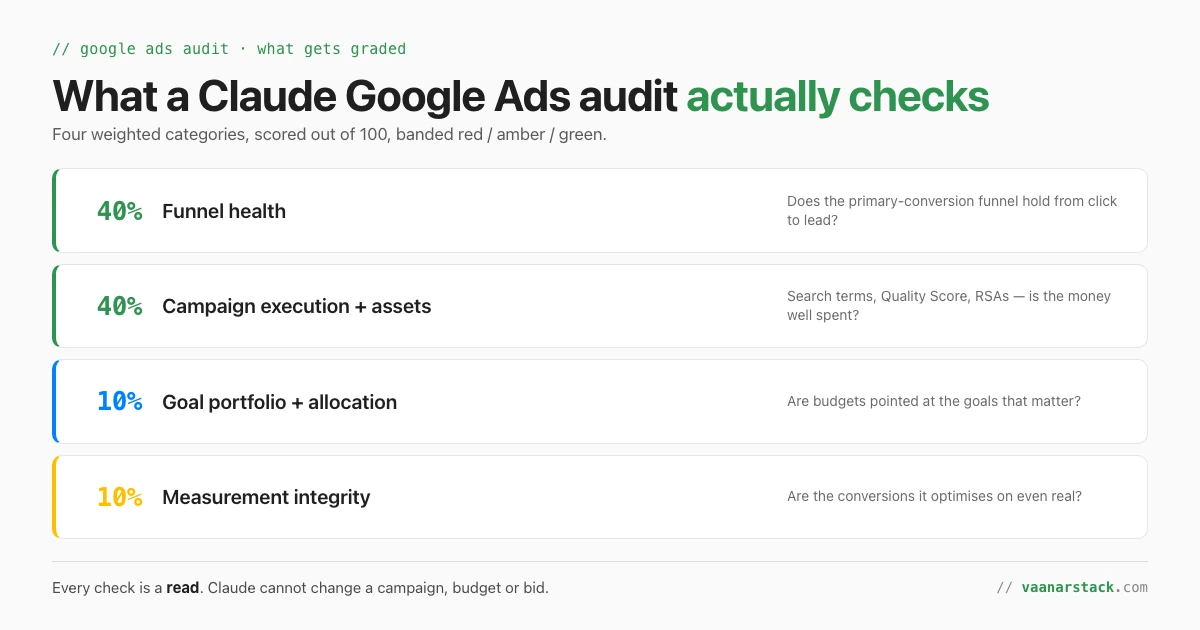
A Claude Google Ads audit grades your account out of 100 across four weighted areas — funnel health (40%), campaign execution and assets (40%), goal portfolio and spend allocation (10%) and measurement integrity (10%) — then names the root cause behind the weakest one and ranks the fixes by rupee impact. Every one of those checks is a read. Claude cannot change a campaign, a budget or a bid in Google Ads. Below is the full list of what gets checked, the part a dashboard cannot do, and — the bit almost nobody publishes — what the audit tells you it could not see.
What does a Claude Google Ads audit actually check?
Four categories, weighted, rolled into one score and a red / amber / green band.
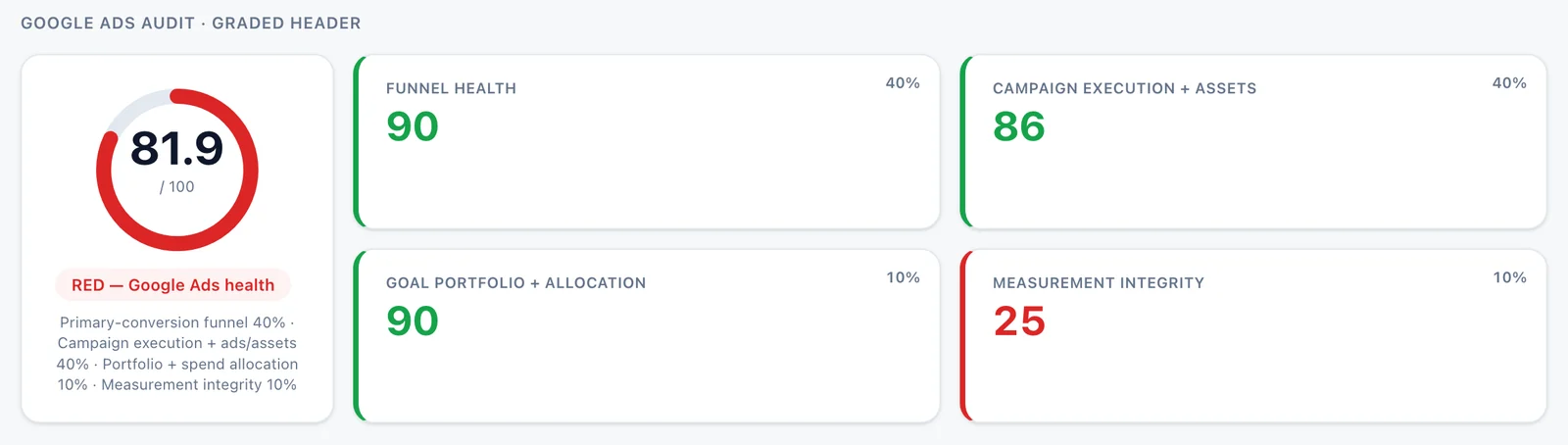
The graded header from a live audit. Client details are redacted; the numbers are real.
| Category | Weight | The question it answers |
|---|---|---|
| Funnel health | 40% | Does the primary-conversion funnel hold from impression to click to lead, or is it leaking at a specific step? |
| Campaign execution + ads/assets | 40% | Search-term coverage, Quality Score distribution, RSA and asset strength — is the spend being executed well? |
| Goal portfolio + spend allocation | 10% | Are budgets pointed at the goals that matter, and is any campaign type quietly absent? |
| Measurement integrity | 10% | Are the conversions the account optimises on actually conversions? |
The two 40% categories are where the money is. The two 10% categories are where the trust is — and as the next section shows, a low score in a 10% category can invalidate everything above it.
Why it is graded and weighted, not just reported
A list of 40 findings is not an audit; it is a to-do list with no order. Weighting forces the tool to commit to what matters, and banding forces it to commit to a verdict.
A weighted score can hide a broken foundation
Here is the most useful thing the grading model does, and it is counter-intuitive. The audit in the screenshot above scores 81.9 out of 100 — on the weighted maths, 90×0.4 + 86×0.4 + 90×0.1 + 25×0.1 = 81.9. That reads like a healthy account. The band says RED.
The band is right and the average is misleading. Measurement integrity scored 25. If you cannot trust the conversion data, then the funnel-health score, the allocation score and every recommendation derived from them are computed on numbers that do not mean what they claim. A weighted average smooths that away; a band refuses to. The band exists to stop you acting on a score you should not trust. That is a general property of any scoring model, not a quirk of this one — if you build your own, build the override too.
Ranked by rupee impact, not by count of issues
The second thing the weighting does is order the output by money rather than by volume. Thirty ad groups with a slightly low Quality Score is one line item. One campaign spending real money at zero conversions is the headline. Audits that rank by issue count invert this constantly, because small problems are more numerous than large ones.
The part a dashboard cannot do: root cause
Any reporting tool can tell you cost per conversion went up. The difference between a dashboard and an audit is whether anything tells you why.
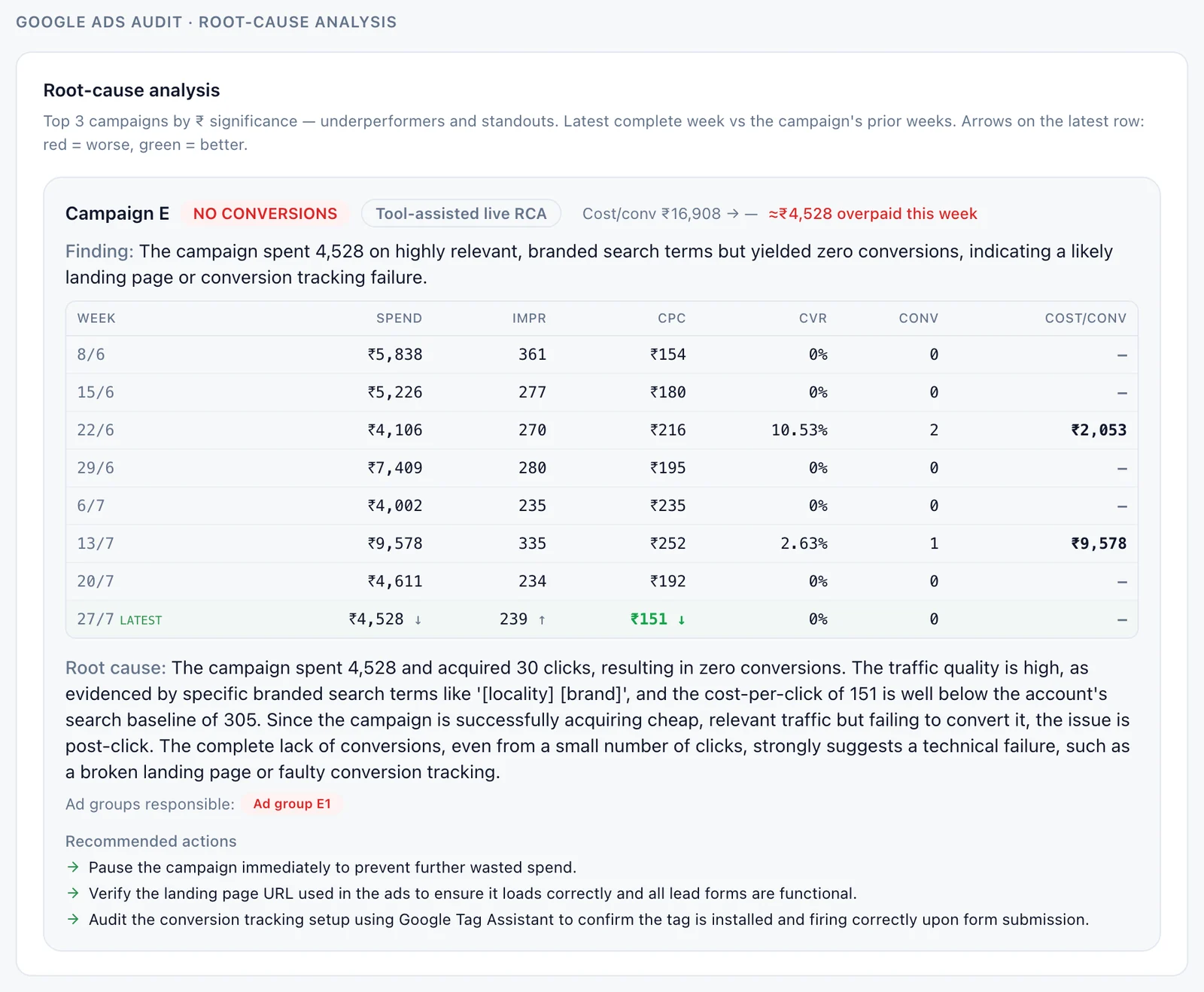
One root-cause block: the weekly trend, the finding, the reasoning, then the actions. Campaign and ad-group names are redacted.
Naming the cause instead of the metric
The block above is doing something specific. It reads eight weeks of trend, notices the campaign is buying cheap, highly relevant traffic and converting none of it, rules out traffic quality as the cause on the evidence of the search terms and a below-baseline CPC, and concludes the failure is post-click — a landing page or a tracking break. Then it says what to do.
That is the shape that matters: a hypothesis tested against data, not a threshold alert. We ran the same pattern live on a CPA anomaly in a webinar — three competing explanations proposed, then each tested in sequence against the account until two were eliminated. The value is not that the AI is clever. It is that the reasoning is written down and you can disagree with it. A red cell in a dashboard gives you nothing to argue with.
Quality Score read as a spend-weighted cost lever
One example of a check that changes meaning when you compute it properly. Most tools report average Quality Score across the account, which is close to useless — the average is dominated by keywords that barely spend. The check worth running is the share of spend sitting below a Quality Score threshold. Ten keywords at QS 3 consuming 60% of budget is a serious cost problem. Two hundred keywords at QS 4 consuming 2% is a rounding error. Same account, same average, completely different verdicts.
It checks whether your conversion set is even trustworthy
This is the 10% category that can turn the whole audit red, and it is the one most audits skip entirely because it is unglamorous.
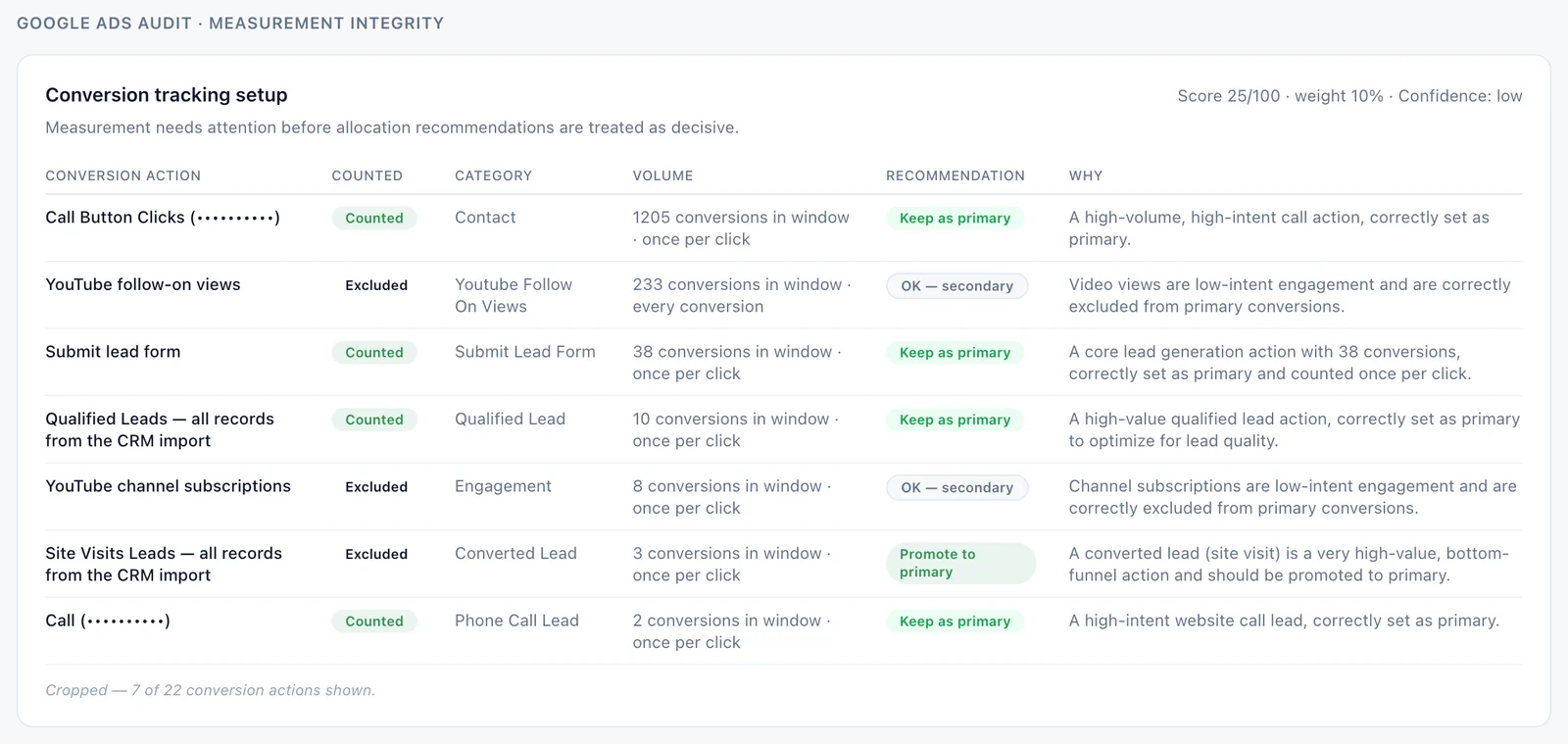
Every conversion action, with a verdict and a reason. Cropped to seven of twenty-two rows; account identifiers redacted.
Low-intent actions counted as primary distort every downstream decision
When a low-intent action — a website visit, a directions tap, a video view — is set as a primary conversion, Smart Bidding optimises toward it. The account then buys more of the cheap thing and reports a rising conversion count while actual leads flatten or fall. We have seen the same failure with a thank-you page view counted as the primary conversion: every downstream decision was trained on arrival, not on outcome.
The table's job is to make that visible action by action, with a recommendation attached to each — keep as primary, demote to secondary, promote to primary — and a stated reason. It also catches the inverse, which is more common than people expect: a genuinely high-value action, often a CRM-imported qualified lead, sitting excluded from optimisation entirely.
Counting rules, and why "every conversion" inflates lead counts
The second column that matters is the counting rule. An action set to count every conversion rather than one per click will inflate its own volume, and if several actions fire on the same journey the account's headline conversion number double-counts that journey. That is why "conversions went up" and "leads went up" so often disagree. Conversion volume and conversion integrity are two separate audits, and only one of them is usually run.
If the tracking itself is the thing you are trying to fix rather than grade, the upstream question is how the events reach Meta or Google at all — we cover that in Conversions API vs Meta Pixel.
What it tells you it could not see
This is the differentiator, and it is the section we would keep if we had to cut every other one. An audit that reports only what it found is indistinguishable from an audit that found nothing because it did not look.
Privacy-limited and unreturned search-term spend, named as unknown
Google does not return every search term. A tool that computes "coverage" over only the terms it received will report a reassuring number that is arithmetically true and practically false. Coverage has to be expressed as a share of the spend the API actually exposed, with the privacy-limited and unreturned portion named as unknown rather than quietly dropped from the denominator.
It refuses to infer business relevance without a brand brief
Whether a search term is relevant to the business is not something you can derive from the ads account. With no saved brief describing what the company sells and to whom, the correct output is "needs review", not a confident guess. Guessing here is how audits produce recommendations that are fluent, specific and wrong.
It states which campaign types had no active campaigns
Silence is ambiguous: a missing Performance Max section could mean PMax is fine, or that nobody looked. Confirming explicitly that a campaign type had no active campaigns in the window turns an absence into a finding.
It gates its own confidence when measurement is weak
Note the "Confidence: low" marker in the measurement screenshot. When conversion integrity scores badly, the audit downgrades its own allocation recommendations rather than presenting them at full confidence — because reallocating budget on the basis of conversion numbers you have just described as untrustworthy would be incoherent. Very few tools will tell you the size of their own blind spot. It is the single best signal that the thing analysing your account is reasoning rather than pattern-matching.
Can Claude change my Google Ads campaigns?
No. Not "it is configured not to" — it cannot.
No — the official MCP is read-only, and it is three tools
Google's official Ads MCP server exposes exactly three tools, and all three are reads: list the accounts you can access, fetch resource metadata, and run a GAQL search query. There is no mutate tool, so there is no pause, no budget change, no bid adjustment and no keyword edit. Unlike Meta's connector there is no hosted URL either — you run it yourself. The full detail is in why the Google Ads MCP is read-only.
For an audit this is a feature. The thing analysing the account cannot alter the account, which means an audit can be run by someone who is not trusted with write access — including on an account managed by an agency you are evaluating.
Do I need to set anything up first?
Yes, and this is the honest part most write-ups skip. The audit itself is fast; getting to the first audit is not.
Connecting Google Ads to Claude — the honest time cost
There is no one-click connector. You need a Google Ads developer token, an OAuth client, and a refresh token, and the developer token needs approval. Budget a working session, not five minutes. The step-by-step is in how to connect Google Ads to Claude.
Do I need a manager (MCC) account?
For the developer token, yes — it is issued against a manager account, so even a single advertiser needs one sitting above the account. This surprises most people mid-setup: why the Google Ads MCP needs a manager account.
Do I need a developer?
For the setup, roughly one working session of someone comfortable with OAuth. For running audits afterwards, no — that is the point. Once the connection exists, an audit is a request in plain English.
| Route | Setup time | Who can do it | What you get |
|---|---|---|---|
| Ads Manager by hand | None | Anyone | The numbers. No reasoning, no ranking, and it does not scale past a few accounts. |
| Official MCP in Claude | A working session, once | Someone comfortable with OAuth | Read access to the account in plain English. Repeatable, and free of charge from Google. |
| A saved audit framework | Setup + writing the framework | Whoever owns the standard | The same audit every time, weighted and banded — comparable across accounts and months. |
What the connector itself will and will not return is covered in the Google Ads MCP capability guide.
How long does an audit take, and what does it cost to run?
The run itself vs the one-time setup
Separate the two or the answer is meaningless. The setup is a one-off working session. A run against a connected account is minutes, most of it spent waiting on the Google Ads API rather than on the model. The connector is free; you pay for model usage, which for a single account audit is not the line item worth optimising.
The real cost is writing the framework — deciding what gets checked, what the weights are and where the thresholds sit. That is a one-time cost that every subsequent audit amortises, and it is also the part that is genuinely yours.
What does Claude miss that a human wouldn't?
Three real gaps, and none of them are fixed by a better prompt.
A universal best practice is a bug in an audit
The most dangerous failure mode is a rule that is correct in general. "Consolidate low-volume ad groups", "raise Quality Score", "add broad match" — each is right on some accounts and actively harmful on others, and an audit applying them uniformly produces confident, well-formatted damage. The fix is account-level guardrails: the framework has to carry the exceptions for this account, which means a human decides them once. A human auditor holds that context implicitly; a tool only holds what you wrote down.
Offline conversions and CRM truth
If a lead becomes revenue three weeks later in a CRM, the ads account cannot see it. Without a CRM join, every allocation recommendation is optimising against lead count, not lead value. Platform and CRM numbers diverging by 15–20% is normal; the audit cannot tell you which side is right because it only has one of them.
No keyword volume on an explorer-level developer token
Keyword Planner data sits behind a higher developer-token access level. On an explorer-level token there is no search-volume data at all, so any question of the form "what are we not bidding on" is out of scope. The audit can tell you what happened in the account. It cannot tell you what is happening in the market.
| What it catches reliably | What it misses | What still needs a human |
|---|---|---|
| Conversion actions mis-set as primary or excluded | Revenue that only exists in the CRM | Deciding which conversion actually matters to the business |
| Spend concentrated below a Quality Score threshold | Search volume and market demand | Whether a term is worth winning at all |
| Campaigns spending at zero conversions, with a cause | Landing-page quality beyond the metrics | Approving and executing the fix — the MCP cannot write |
| Structural gaps: absent campaign types, unset goals | Anything outside the ads account | The account-level exceptions to every best practice |
Is a Claude audit as good as a human PPC audit?
On coverage and consistency, better. On judgement, no — and judgement is where the expensive decisions live. The useful framing is not which is better but which parts each should own.
Faster, repeatable, and decoupled from the team being audited
Three advantages are structural rather than intellectual. It is fast, so an audit can be monthly instead of annual. It is repeatable: the same framework produces comparable scores across months and across accounts, which a human working from memory does not. And it is decoupled — because it needs only read access, the audit can be run by someone with no stake in the result. A team auditing its own work is the oldest conflict of interest in this industry, and read-only access is a surprisingly good solution to it.
What it will not do is decide. It hands you a ranked, reasoned list with its own blind spots labelled, and the decisions stay with you.
We run this as a fixed-scope paid audit — the framework, the four categories, the root causes and the honest list of what we could not see, on your account. See how the Google Ads audit works.
Frequently asked questions
Can Claude audit my Google Ads account?
Yes. Once Google Ads is connected through the official Ads MCP, Claude can read the account and run a structured audit across the whole thing — campaigns, search terms, Quality Score, assets, goals and conversion tracking. It reads only; it cannot make changes.
What does a Claude Google Ads audit actually check?
Four weighted categories: funnel health (40%), campaign execution and ads/assets (40%), goal portfolio and spend allocation (10%), and measurement integrity (10%). These roll into a score out of 100 and a red / amber / green band, with the root cause named for the weakest areas and fixes ranked by rupee impact.
Is it safe to give Claude access to my Google Ads account?
The official Google Ads MCP is read-only, so the exposure is disclosure rather than damage — it can see what your account contains but cannot spend money, pause campaigns or edit anything. Grant read-only access at the Google Ads level too rather than relying on the tool alone, and remember the connection runs on your own credentials, so it can be revoked at any time.
Can Claude change my campaigns, or only read them?
Only read. Google's official Ads MCP exposes three tools — list accessible customers, get resource metadata, and run a search query. There is no mutate tool, so pausing a campaign, changing a budget or editing a keyword is not possible through it.
Does it work on a manager (MCC) account?
Yes, and in practice you need one: the Google Ads developer token is issued against a manager account, so even a single advertiser account needs an MCC above it. Once connected you can query the accounts under that manager.
How long does an AI Google Ads audit take?
The run itself takes minutes, most of that waiting on the Google Ads API. The one-time setup — developer token, OAuth client, refresh token — takes a working session, and writing your own audit framework takes longer than either but only happens once.
What does Claude miss that a human wouldn't?
Three things. Revenue that only exists in your CRM, so it optimises on lead count rather than lead value. Search volume and market demand, which need a higher developer-token access level than most accounts have. And the account-specific exceptions to general best practice — a universal rule applied uniformly is a bug in an audit, and only a human can write down which rules do not apply here.
FAQ
Can Claude audit my Google Ads account?
Yes. Once Google Ads is connected through the official Ads MCP, Claude can read the account and run a structured audit across the whole thing - campaigns, search terms, Quality Score, assets, goals and conversion tracking. It reads only; it cannot make changes.
What does a Claude Google Ads audit actually check?
Four weighted categories: funnel health (40%), campaign execution and ads/assets (40%), goal portfolio and spend allocation (10%), and measurement integrity (10%). These roll into a score out of 100 and a red / amber / green band, with the root cause named for the weakest areas and fixes ranked by rupee impact.
Is it safe to give Claude access to my Google Ads account?
The official Google Ads MCP is read-only, so the exposure is disclosure rather than damage - it can see what your account contains but cannot spend money, pause campaigns or edit anything. Grant read-only access at the Google Ads level too rather than relying on the tool alone, and remember the connection runs on your own credentials, so it can be revoked at any time.
Can Claude change my campaigns, or only read them?
Only read. Google's official Ads MCP exposes three tools - list accessible customers, get resource metadata, and run a search query. There is no mutate tool, so pausing a campaign, changing a budget or editing a keyword is not possible through it.
Does it work on a manager (MCC) account?
Yes, and in practice you need one: the Google Ads developer token is issued against a manager account, so even a single advertiser account needs an MCC above it. Once connected you can query the accounts under that manager.
How long does an AI Google Ads audit take?
The run itself takes minutes, most of that waiting on the Google Ads API. The one-time setup - developer token, OAuth client, refresh token - takes a working session, and writing your own audit framework takes longer than either but only happens once.
What does Claude miss that a human wouldn't?
Three things. Revenue that only exists in your CRM, so it optimises on lead count rather than lead value. Search volume and market demand, which need a higher developer-token access level than most accounts have. And the account-specific exceptions to general best practice - a universal rule applied uniformly is a bug in an audit, and only a human can write down which rules do not apply here.
