Conversions API vs Meta Pixel: Do You Actually Need Both?
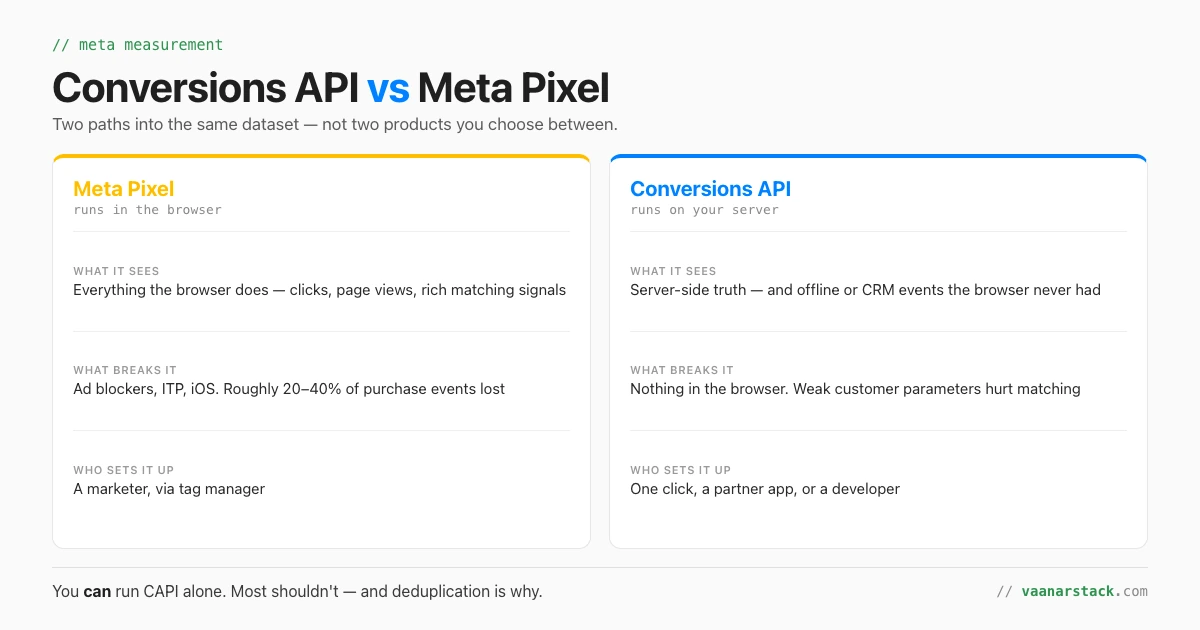
The Meta Pixel is browser-side JavaScript. The Conversions API sends the same events from your server. They report to the same place — one dataset — so they are not two products you choose between. You can run the Conversions API on its own: it is a supported setup, not a workaround. But most advertisers should run both and deduplicate, because each path sees things the other cannot. Here is the actual difference, why browser restrictions made CAPI matter, the four ways to set it up, and how deduplication stops your conversions doubling.
What is the difference between the Meta Pixel and the Conversions API?
Where the event is sent from, and therefore what can stop it.
| Meta Pixel | Conversions API | |
|---|---|---|
| Where it runs | In the visitor's browser | On your server, or a partner's |
| What it can see | Browser-side behaviour, plus cookie and browser signals that help matching | Anything your server knows — including offline and CRM events the browser never saw |
| What breaks it | Ad blockers, Safari's ITP, iOS privacy settings, consent tooling | Nothing in the browser. Weak customer parameters reduce match quality |
| Who implements it | A marketer with tag-manager access | One click, a partner app, or a developer — depending on the route |
They both write to the same place: the dataset
This is the bit that clears up most of the confusion. Events do not go "to the pixel" or "to the API" — they go to a dataset, and both paths are just transports into it. Creating a pixel provisions a dataset with the same numeric ID, which is why the two words get used interchangeably. A CAPI-only dataset can be created independently. So "no pixel" means no browser code. It does not mean no dataset ID.
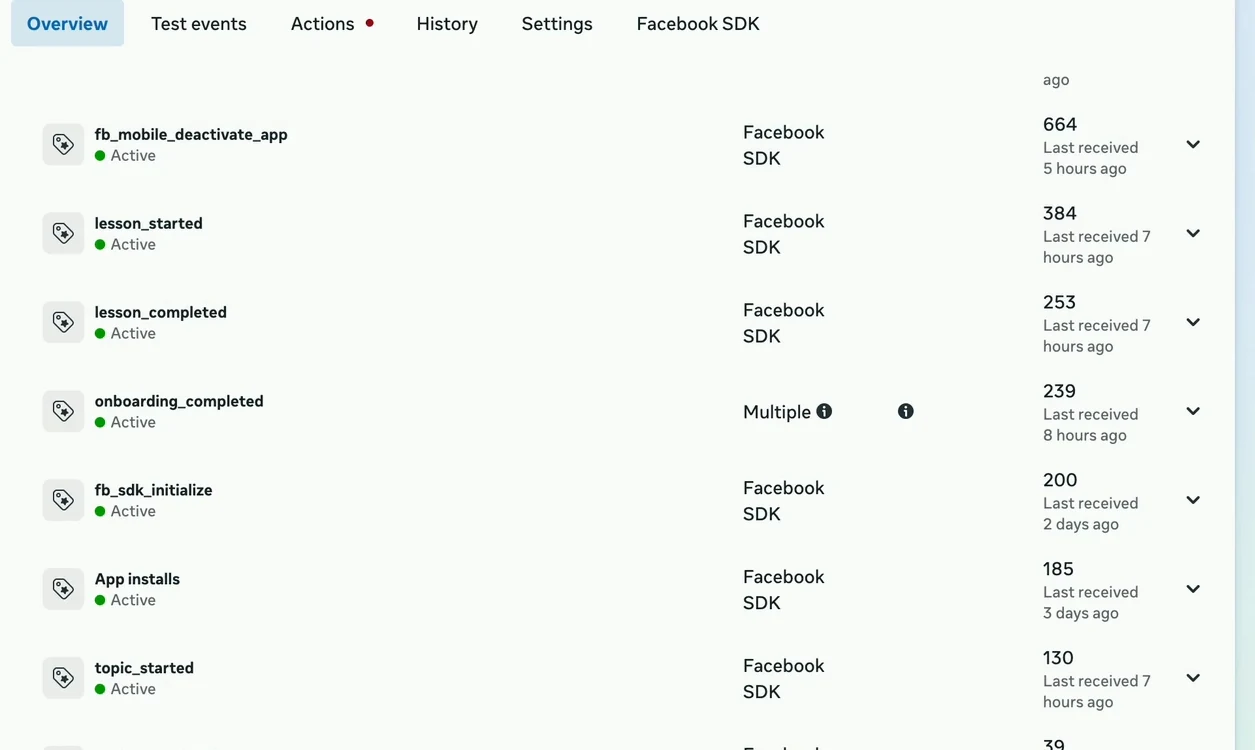
One dataset, several event sources. Note the event marked Multiple — that is the same action arriving by more than one path, which is exactly the situation deduplication exists to handle.
Why has CAPI become important? Browser restrictions.
Nothing about server-side tracking is new. What changed is how much the browser stopped telling you.
Ad blockers, ITP and iOS
Browser-side tracking now misses roughly 20–40% of purchase events, depending on audience and device mix. Ad blockers stop the script loading at all. Safari's Intelligent Tracking Prevention caps cookie lifetimes. iOS privacy prompts remove identifiers. None of these are bugs to fix — they are the platform working as designed, and the trend only goes one way. The Conversions API runs server-side, where none of those restrictions apply.
The loss is not random, and that is the real damage
Losing a fifth of your events would be survivable if it were a clean random sample. It is not. The events that survive skew toward the browsers, devices and users that block least — typically older Android and desktop Chrome, and away from iOS Safari. The optimiser then trains on that skewed sample and buys more of the audience it can still see. So the damage is not just under-reporting; it is a slow, invisible drift in who your campaigns target. Under-reporting you can estimate and correct for. A biased training signal you cannot.
What Meta says the difference is worth
Meta's own published figure, from April 2026, is an average 17.8% lower cost per result for advertisers using the Conversions API for web events. Treat that as Meta's number rather than an independent finding — it is a vendor reporting on its own product, and the honest read is that the direction is well-supported and the magnitude will vary a lot by account. The mechanism is not mysterious: more complete conversion data means better-informed bidding.
Can you run Meta ads with CAPI only, and no pixel?
Yes. Server events are linked to a dataset and processed the same way as pixel, SDK, offline event set or CSV-uploaded events. You can build audiences, optimise campaigns and report on conversions with server events alone. This is a supported configuration, not a hack.
Yes — and here is exactly what you give up
- Browser-side matching signals. Cookie and browser parameters help Meta match an event to a person. Without them you are relying entirely on the customer data you send, which raises the stakes on your parameter quality.
- Some attribution completeness. View-through and cross-device paths that the browser observed are harder to reconstruct from the server alone.
- Easy debugging. A pixel misfire is visible in a browser console in seconds. A server-side event that never fired is a log-hunting exercise.
- Fast iteration on new events. Adding an event via tag manager is a marketer's afternoon; adding one server-side is a release.
When CAPI-only is the right call
There are real cases. Server-rendered or headless checkouts where the conversion never happens in a page you control. Apps and platforms where the browser is not in the path. Businesses whose true conversion is offline or CRM-driven — a qualified lead, a site visit, a signed contract — so the meaningful event was never available browser-side anyway. And organisations with a strict privacy posture that have decided not to run third-party JavaScript at all.
Why both is still the default recommendation
Because the two paths fail in different places. The browser sees signals your server does not; your server sees outcomes the browser never will. Running both with deduplication configured consistently beats either alone, and the redundancy means a broken tag or a blocked script degrades your data instead of deleting it. "Run both" is a recommendation, not a technical requirement — but it is the right default.
How do you set up the Conversions API? Four routes, ranked by effort.
The setup question has a much better answer in 2026 than it did two years ago.
One-click setup in Events Manager (new in 2026)
Launched April 2026. In Events Manager, Meta can turn on server-side sending for standard web events without you writing code or hosting anything. It is the fastest possible start and it costs nothing. The limits matter, though: it covers standard web events only. It does not cover custom events, and it does not cover offline conversions.
Partner integration (Shopify, WooCommerce, WordPress)
If your store runs on a supported platform, the integration is a settings screen. This is the right route for most e-commerce businesses: no code, maintained by the platform, and it sends richer customer parameters than a generic setup because the platform already has the order data.
Conversions API Gateway
A hosted middle layer that forwards events to Meta without you building a server integration. Useful when you cannot use a partner app but do not want to own application code — it trades a subscription for engineering time.
Direct server-side API
Your application calls the Conversions API itself. This is the only route that covers everything: custom events, CRM joins, offline conversions, deduplication you control, and transformations specific to your business. It is also the only one that needs a developer and ongoing maintenance.
| Route | Effort | Who can do it | Custom events? | Offline? |
|---|---|---|---|---|
| One-click in Events Manager | Minutes | A marketer | No | No |
| Partner integration | An hour | Whoever admins the store | Limited | No |
| Conversions API Gateway | A day, plus a subscription | Marketer + light technical help | Partial | No |
| Direct server-side API | A project | A developer | Yes | Yes |
Start at the top. Most accounts that "need CAPI" are fully served by route one or two, and the teams that jump straight to a custom integration usually spend a quarter building something the platform now does in a settings toggle.
Will running both double-count my conversions?
Not if deduplication is configured. If it is not, yes — and it will do so silently.
No, if deduplication is configured — event_name and event_id must match
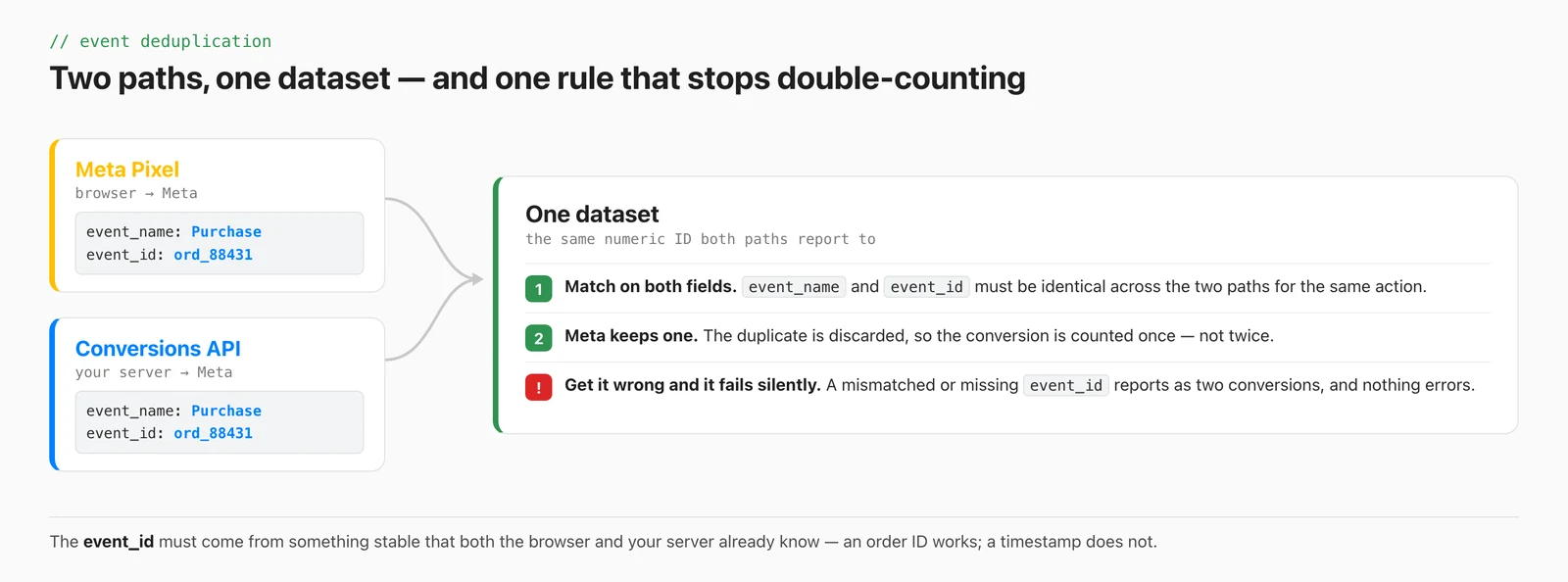
The rule is small. For the same action, both paths must send the same
event_name and the same event_id. Meta matches on the pair and keeps one.
The event_id has to come from something stable that the browser and your server both
already know — an order ID, a transaction reference, a session-scoped UUID you generate before
the event fires. A timestamp does not work, because the two paths will not agree on it.
How to check deduplication is actually working
- In Events Manager, open the event and look at the source breakdown. An event arriving on both paths should show multiple sources with a deduplication indicator — not two separate counts.
- Compare the reported conversion count against your own source of truth for the same window. Roughly double is the signature of failed deduplication, and it is unmistakable.
- Use Test Events with a real
event_idand confirm both events arrive and one is dropped. Do this before you trust a week of data, not after. - Re-check after any release that touches checkout. Deduplication breaks quietly whenever the ID's source changes.
The failure mode here is worth naming, because it is the same shape as most measurement bugs: it does not error. Nothing turns red. Your conversions simply look better than they are, your reported cost per result halves, and every decision you make from that data is wrong in the same direction.
What is a good Event Match Quality score?
Match quality is not a measure of how many events you send. It is a measure of how well Meta can tie each event to a person, and it is driven almost entirely by the customer parameters you include. Anything in the 6–7 range is workable, 8+ is good, and below 5 is worth fixing before you change anything else — a low match rate degrades optimisation regardless of how complete your event coverage is.
The parameters that move it most
| Parameter | Effect on match quality | Effort to add |
|---|---|---|
| Email (hashed) | Highest single lift | Low — you usually already have it at checkout |
| Phone (hashed, with country code) | High, especially in India | Low, but formatting errors are common |
| Click ID (fbc) and browser ID (fbp) | High when present | Medium — must be captured browser-side and passed to your server |
| External ID (your own user ID) | Moderate, and improves repeat matching | Low if you have accounts |
| Name, city, postcode, country | Small individually, useful together | Low |
The click ID is the one most CAPI-only setups miss: it originates in the browser, so a pure server-side implementation has to deliberately capture and forward it. That single omission explains a lot of otherwise-puzzling low match scores.
Conversion integrity: the audit almost nobody runs
Everything above is about getting events delivered. This section is about whether the events you are delivering are the right ones — a separate question, and usually the more expensive one.
Half your conversions may not be conversions
The failure we see most often has nothing to do with transport. A thank-you page view gets set as the primary conversion, so every downstream decision is trained on arrival rather than on outcome. The account optimises toward the cheap event, the conversion count climbs, and actual revenue does not move. Low-intent actions promoted to primary — page views, directions taps, video views — do the same thing.
Volume and integrity are two different audits
"Are we capturing enough events?" and "are these the right events?" are separate questions with separate fixes, and teams routinely run only the first. CAPI is the answer to the first. It is not the answer to the second. We go through how to grade this systematically in what a Claude-run ads audit actually checks — the same measurement-integrity check applies on both platforms.
Platform vs CRM: 15–20% variance is normal, more is a signal
Platform-reported conversions and CRM records will never match exactly — attribution windows, deduplication and modelling all differ. A gap of 15–20% is unremarkable. A gap much larger than that is information: it usually means deduplication has failed, an event is double-firing, or the platform is counting something the business does not consider a conversion.
CAPI does not fix a badly chosen conversion event
Worth stating plainly, because the marketing around server-side tracking implies otherwise. Sending the wrong event more reliably makes the wrong signal stronger. If your primary conversion is the wrong action, the Conversions API will faithfully deliver more of it, and your optimisation will get more confidently worse. Fix which event you count first; fix how it travels second.
Can I optimise toward a custom event?
Yes — and there is a widely-repeated bit of folklore here that is simply wrong.
Yes — and you do not need an Events Manager custom conversion to do it
The common advice is that a custom event must first be wrapped in a "custom conversion" in Events
Manager before a campaign can optimise toward it. It does not. A custom event is selectable directly
as the optimisation goal through the API: set the promoted object's custom event type to
OTHER and pass the event name as a string. We shipped this on a live campaign.
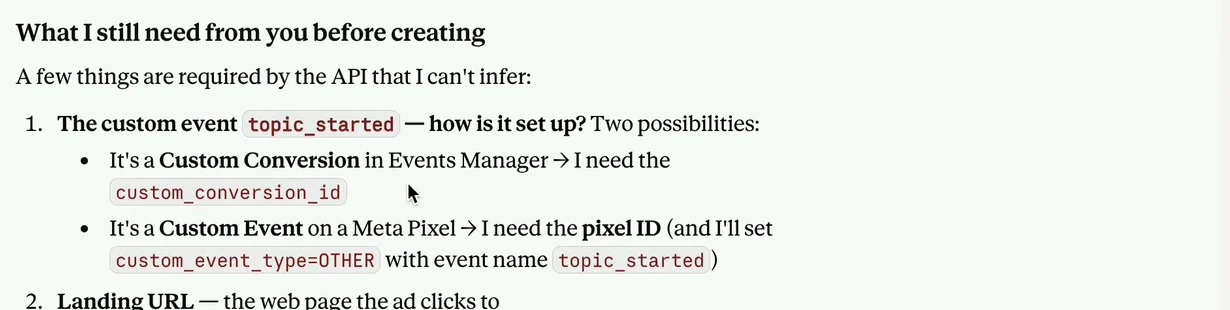
The distinction, asked back at us mid-build. Both branches are valid — and the second one needs no custom conversion at all. Note that it will not guess: an event source it cannot infer becomes a question rather than an assumption, which is the behaviour you want from anything touching a live ad account.
When a custom conversion IS the right tool
Custom conversions still earn their place when you need rules rather than a bare event: a Purchase above a value threshold, a lead from a specific URL pattern, a subset of one event treated as its own goal. That is a filter defined in Meta's UI, and it is the correct tool for that job. Use it when you need the rule, not as a mandatory step you were told to perform. If you are choosing which event to optimise for in the first place, the campaign-build walkthrough in creating a Meta campaign through the MCP covers the event-source questions that come up, and what an AI assistant can and cannot manage in an ad account covers where the boundary sits.
Conversion integrity is one of the four categories in our paid audit — every conversion action graded, with the counting rules and the deduplication check. See how the Meta ads audit works.
Frequently asked questions
Do I need both the Conversions API and the Meta Pixel?
Technically no — you can run the Conversions API on its own and it is a fully supported setup. In practice most advertisers should run both and deduplicate, because the browser sees matching signals your server does not, and your server sees outcomes the browser never will.
Is the Conversions API replacing the pixel?
No. They are two transports into the same dataset, not two generations of the same product. The pixel is losing coverage to browser restrictions, which is why CAPI matters more each year, but browser events still carry signals that improve matching.
What breaks if I only run the pixel?
You lose roughly 20–40% of purchase events to ad blockers, Safari's ITP and iOS privacy settings, and you cannot send offline or CRM conversions at all. The bigger problem is that the loss is not random: it skews toward certain browsers and devices, so the optimiser trains on a biased sample of your audience.
Will running both double-count my conversions?
Only if deduplication is not configured. Send the same event_name and the same event_id on both paths and Meta keeps one. If the IDs do not match, both are counted and nothing errors — your conversion numbers simply look about twice as good as they are.
What is event deduplication and how do I check it works?
It is Meta matching the same action arriving on two paths and keeping one copy, based on event_name plus event_id. To check it: open the event in Events Manager and confirm it shows multiple sources with deduplication rather than two separate counts, compare the totals against your own records for the same window, and run a Test Event with a real event_id to watch one copy get dropped.
Does CAPI actually improve performance, or just reporting?
Both, and the two are connected — better conversion data means better-informed bidding, not just a nicer report. Meta's own published figure from April 2026 is an average 17.8% lower cost per result for advertisers using CAPI for web events. That is a vendor's number on its own product, so read the direction as well-supported and the exact magnitude as account-dependent.
How do I set up CAPI without a developer?
Three of the four routes need no developer. Events Manager has had a one-click setup since April 2026 that covers standard web events with no code. Platform integrations for Shopify, WooCommerce and WordPress are a settings screen. The Conversions API Gateway is a hosted middle layer. Only custom events, CRM joins and offline conversions require the direct server-side API.
What's a good Event Match Quality score?
6–7 is workable, 8 and above is good, and below 5 is worth fixing before you change anything else. It is driven by the customer parameters you send — hashed email and phone give the biggest lift, and the click ID (fbc) is the one that CAPI-only setups most often forget to capture and forward from the browser.
Can I send custom events through CAPI?
Yes, through the direct server-side API. And you can optimise toward a custom event without first creating a custom conversion in Events Manager — set the promoted object's custom event type to OTHER and pass the event name as a string. Custom conversions are for rules, such as a purchase above a value threshold, not a mandatory wrapper.
FAQ
Do I need both the Conversions API and the Meta Pixel?
Technically no - you can run the Conversions API on its own and it is a fully supported setup. In practice most advertisers should run both and deduplicate, because the browser sees matching signals your server does not, and your server sees outcomes the browser never will.
Is the Conversions API replacing the pixel?
No. They are two transports into the same dataset, not two generations of the same product. The pixel is losing coverage to browser restrictions, which is why CAPI matters more each year, but browser events still carry signals that improve matching.
What breaks if I only run the pixel?
You lose roughly 20-40% of purchase events to ad blockers, Safari's ITP and iOS privacy settings, and you cannot send offline or CRM conversions at all. The bigger problem is that the loss is not random: it skews toward certain browsers and devices, so the optimiser trains on a biased sample of your audience.
Will running both double-count my conversions?
Only if deduplication is not configured. Send the same event_name and the same event_id on both paths and Meta keeps one. If the IDs do not match, both are counted and nothing errors - your conversion numbers simply look about twice as good as they are.
What is event deduplication and how do I check it works?
It is Meta matching the same action arriving on two paths and keeping one copy, based on event_name plus event_id. To check it: open the event in Events Manager and confirm it shows multiple sources with deduplication rather than two separate counts, compare the totals against your own records for the same window, and run a Test Event with a real event_id to watch one copy get dropped.
Does CAPI actually improve performance, or just reporting?
Both, and the two are connected - better conversion data means better-informed bidding, not just a nicer report. Meta's own published figure from April 2026 is an average 17.8% lower cost per result for advertisers using CAPI for web events. That is a vendor's number on its own product, so read the direction as well-supported and the exact magnitude as account-dependent.
How do I set up CAPI without a developer?
Three of the four routes need no developer. Events Manager has had a one-click setup since April 2026 that covers standard web events with no code. Platform integrations for Shopify, WooCommerce and WordPress are a settings screen. The Conversions API Gateway is a hosted middle layer. Only custom events, CRM joins and offline conversions require the direct server-side API.
What's a good Event Match Quality score?
6-7 is workable, 8 and above is good, and below 5 is worth fixing before you change anything else. It is driven by the customer parameters you send - hashed email and phone give the biggest lift, and the click ID (fbc) is the one that CAPI-only setups most often forget to capture and forward from the browser.
Can I send custom events through CAPI?
Yes, through the direct server-side API. And you can optimise toward a custom event without first creating a custom conversion in Events Manager - set the promoted object's custom event type to OTHER and pass the event name as a string. Custom conversions are for rules, such as a purchase above a value threshold, not a mandatory wrapper.
