How to Connect Google Ads to Claude - and Why There's No Simple Link
How do you connect Google Ads to Claude?
There is no link to paste. Google ships its Ads MCP as a repository you host yourself — you clone it, run it somewhere (Cloud Run, Docker, or locally with pipx), and point Claude at your own endpoint. The Google Ads MCP setup is genuinely an hour of work, not the two minutes Meta's connector takes, and almost all of that hour is credentials.
That difference is not an oversight. It follows from a deliberate choice about how much control each platform is willing to hand over, and it shapes everything else about the setup.
Why there's no Google Ads connector to paste
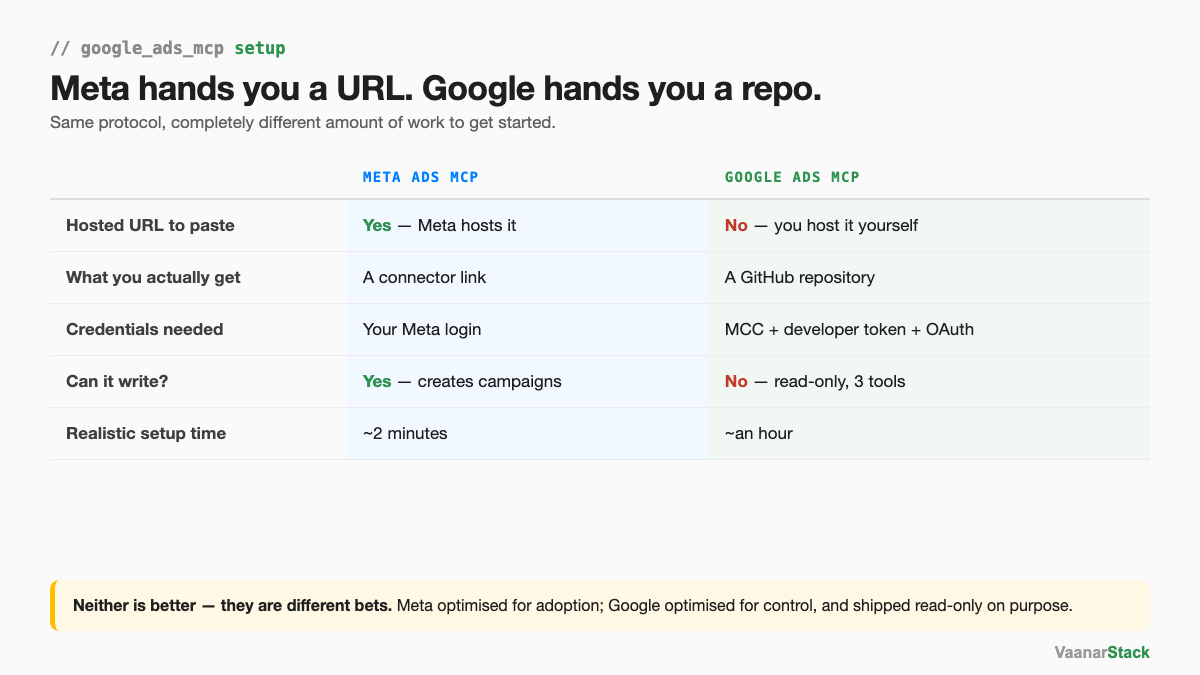
Meta hands you a URL. Google hands you a repo.
Meta hosts its connector, so connecting is a sign-in. Google publishes an open-source server and leaves the hosting to you. Same protocol, completely different starting cost.
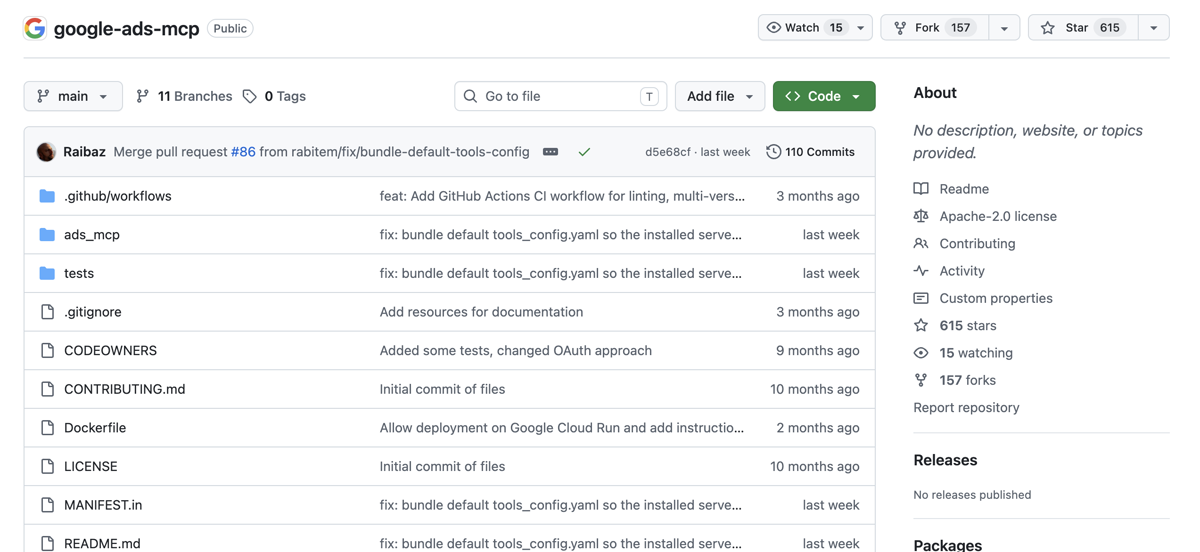
That's the whole thing: a public repository under Apache-2.0, with a Dockerfile whose commit history literally reads "Allow deployment on Google Cloud Run". There's no endpoint anywhere on that page, because there isn't one to publish.
What you need before you start
A manager (MCC) account — and what it's actually for
Google issues developer tokens to manager accounts only. That is the sole reason an MCC appears in this setup. It is not what grants access to your ad accounts — a distinction worth getting right before you start moving accounts around, which we unpack in whether you actually need an MCC.
A developer token, and the access tier you'll actually get
The token is issued from the API Center inside your MCC, and it carries an access tier. Lower tiers cap how many operations you get per day, which doesn't stop you connecting but does matter if you build something that polls. We hit exactly this while building a Google Ads dashboard — the fix was making it pull only on manual refresh rather than on every open.
OAuth credentials
Created in Google Cloud Console. This is the step that determines which accounts you can see, because the consent flow runs against a specific Google user.
- MCC account — holds the developer token
- Developer token — permission to call the API at all
- OAuth client + consent — establishes which user is asking
- Customer ID — names the account being queried
Can you connect accounts from more than one MCC?
Yes — your Google login decides which accounts you can reach
One developer token can serve accounts sitting under any number of managers. The token says you may use the API; your login says which accounts you may use it on. If your Google user has access to a client's account under their manager and to your own under yours, both are reachable without restructuring anything.
The MCC is for the token, not for the accounts inside it
This is the most common piece of bad advice in this space — that you must consolidate every account under a single manager before you begin. You don't. The manager account you create to obtain a token can manage nothing at all.
When you need login-customer-id
There is one place a manager ID genuinely belongs on the call: when you reach a client account through a manager. The login-customer-id header tells Google which relationship you're acting under. Miss it and you get an empty account list rather than an error — which reads like a permissions problem and isn't.
Step by step: host and connect the Google Ads MCP
Option A — run it locally with pipx
The fastest way to confirm your credentials work. Install the server with pipx, give it your token, OAuth details and customer ID, and run it on your machine. Claude connects to localhost. Nothing is exposed to the internet, which makes this the right first step — you're testing credentials, not building infrastructure.
The limitation is obvious: it only runs while your machine does. Fine for testing, useless for anything scheduled.
Option B — host it on Cloud Run
What we did. The repository ships a Dockerfile specifically to support this, so it's build the image, deploy to Cloud Run, and you have a URL. That URL is the thing you paste into Claude — the equivalent of Meta's hosted connector, except you're the one hosting it.
Cloud Run suits this well because it scales to zero: you pay for the requests you make, which for an ads MCP is close to nothing.
Point Claude at your endpoint
Add your own URL as a custom connector in Claude's settings. From here the experience is identical to Meta's — the difference was all in getting the endpoint to exist.
Verify it worked
Ask Claude to list your accessible customers. Names back means the token, the OAuth consent and the hosting are all correct simultaneously. An empty list means you're reaching a client account through a manager without passing the manager ID.
What you can do once it's connected — and what you can't
Three tools, all reads
Google's official server is read-only by design. It will pull performance, structure and metadata, and it cannot change a single thing — no pausing an ad, no adjusting a bid, no creating a campaign. The full picture of what that means in practice is in whether the Google Ads MCP can create campaigns.
It's also worth being clear about what read-only doesn't mean. As Yash put it in our Google Ads MCP webinar: "It does not have any hidden access to something which is not available to you." The MCP sees what your account sees. It is not a back door to data Google hides from the interface — search terms inside Performance Max stay hidden either way.
When it can't pull your account
The unverified-app warning
Because you created the OAuth client yourself, Google shows an "unverified app" screen during consent. This is expected for an internal tool — it's your own client, not a third party's — and you continue past it. It is not a sign anything is misconfigured.
Reaching a client account without login-customer-id
The empty-list failure again, and the one that wastes the most time because nothing errors. We hit it live in a cohort session: listing accounts returned nothing at all until the manager account ID was passed.
| Symptom | Likely cause | Fix |
|---|---|---|
| Every call fails at auth | No developer token, or the wrong one | Check the token from your MCC's API Center |
| Empty account list, no error | Client account reached through a manager | Pass the manager ID as login-customer-id |
| "Google hasn't verified this app" | Your own OAuth client, unverified | Expected — continue past it |
| Connects, wrong accounts listed | Authorised with the wrong Google user | Re-run consent as the right user |
If the setup is the part you'd rather skip, we run Google Ads audits on exactly this stack — same read-only approach, without you hosting anything.
Frequently asked questions
Why is there no Google Ads connector for Claude?
Because Google publishes its Ads MCP as an open-source repository rather than a hosted service. There is no Google-run endpoint to paste, so you host the server yourself — on Cloud Run, in Docker, or locally with pipx — and connect Claude to your own URL.
Do I need a manager account for the Google Ads MCP?
Yes, because developer tokens are only issued to manager (MCC) accounts. But the manager account is only there to hold the token — it does not need to manage the accounts you want to analyse, and it does not control which accounts you can see.
How do I host the Google Ads MCP?
Two practical routes. Locally with pipx, which is the fastest way to verify your credentials but only runs while your machine does. Or on Google Cloud Run using the Dockerfile in the repository, which gives you a persistent URL and scales to zero when idle.
Is the Google Ads MCP free?
The server is open source and free, and the manager account and developer token cost nothing. You pay only for whatever you host it on, which for Cloud Run at this volume is negligible.
Can Claude change my Google Ads campaigns once it's connected?
No. Google's official MCP is read-only — three tools, all reads. It can audit an account in detail and cannot pause an ad, change a bid or create a campaign. Write access requires going to the Google Ads API directly, with its own approval process.
Can I connect Google Ads accounts from different manager accounts?
Yes. A single developer token can serve accounts across any number of managers. Which accounts you can actually read is decided by the Google user you authorised with, so as long as that user has access, the accounts do not need to share a manager.
FAQ
Why is there no Google Ads connector for Claude?
Because Google publishes its Ads MCP as an open-source repository rather than a hosted service. There is no Google-run endpoint to paste, so you host the server yourself - on Cloud Run, in Docker, or locally with pipx - and connect Claude to your own URL.
Do I need a manager account for the Google Ads MCP?
Yes, because developer tokens are only issued to manager (MCC) accounts. But the manager account is only there to hold the token - it does not need to manage the accounts you want to analyse, and it does not control which accounts you can see.
How do I host the Google Ads MCP?
Two practical routes. Locally with pipx, which is the fastest way to verify your credentials but only runs while your machine does. Or on Google Cloud Run using the Dockerfile in the repository, which gives you a persistent URL and scales to zero when idle.
Is the Google Ads MCP free?
The server is open source and free, and the manager account and developer token cost nothing. You pay only for whatever you host it on, which for Cloud Run at this volume is negligible.
Can Claude change my Google Ads campaigns once it's connected?
No. Google's official MCP is read-only - three tools, all reads. It can audit an account in detail and cannot pause an ad, change a bid or create a campaign. Write access requires going to the Google Ads API directly, with its own approval process.
Can I connect Google Ads accounts from different manager accounts?
Yes. A single developer token can serve accounts across any number of managers. Which accounts you can actually read is decided by the Google user you authorised with, so as long as that user has access, the accounts do not need to share a manager.
