Can Claude Create and Launch a Meta Ad Campaign?
Can Claude create a Meta ad campaign?
Yes — and it works, but it is semi-manual. Using Meta's official Ads MCP, Claude will build a campaign, ad set, and ad conversationally, and it gets most of the setup right — because you hand it a written brief, not because it is guessing. The two things you still do yourself are getting the creative into Meta first, and giving it the exact location ID. Neither is hard once you know it, and both are one-time-per-asset, not per-campaign.
We built one on camera. Here is how the brief drives it, how the creative flows in, and the one setting it switches on without asking.
You give it a documented brief — that's why it gets the setup right
The MCP does not invent your campaign. It reads a brief you have written — a plain markdown file with the campaign's details — and builds from it. In our setup every campaign lives in its own folder with a brief.md, alongside shared documentation: the account rules in meta-guidelines.md, how to drive the MCP in meta-mcp-usage.md, and the hard-won geo-targeting keys in meta-location-targeting-learnings.md. Claude reads those first, then creates the campaign to match.
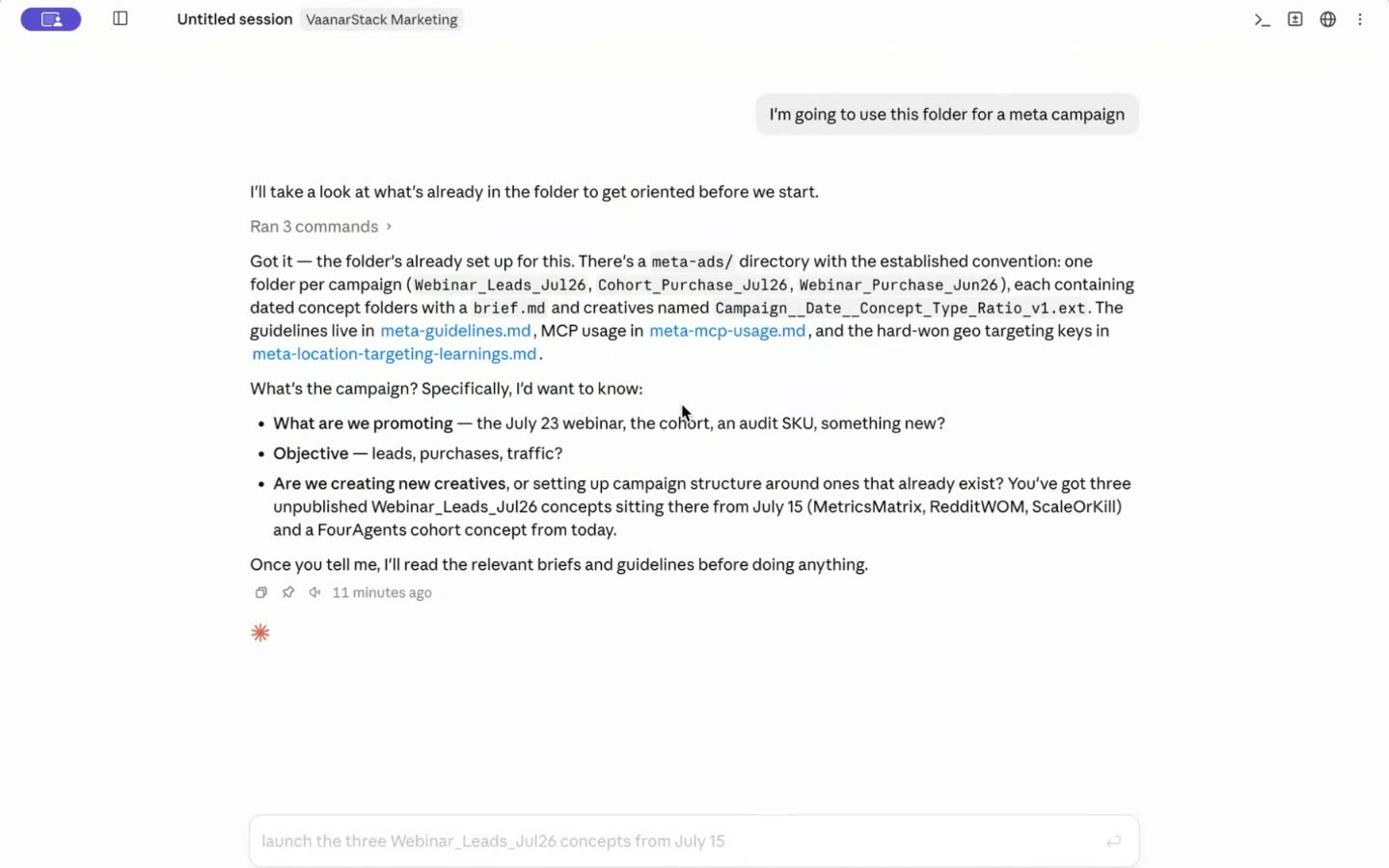
Because the campaign is documented, Claude got all of this right on the first pass, verified afterwards in Ads Manager:
- The conversion event — taken from the brief.
- A sensible ad set name following the naming convention.
- The conversion location.
- The bid strategy (maximize conversions).
- The daily budget.
In its own words during the build: "It is at least doing a basic job of getting the ads created." Write the brief well and the structure comes out correct; leave it vague and you get vague. The document is the input that matters.
The creative: upload it to your media library once
The MCP will not upload a video or image for you — but it does read your Meta media library and match each asset by its hash. So the flow is: put the creative into Meta once, then let Claude find it and attach it. Two ways:
- Upload to the media library — in Business Manager, go to All Tools → Media Library → your ad account → Ad account media, and upload the video (or image). You can bulk-upload many at once; it lives in the cloud, so campaign creation can reference it any time.
- Or point it at a hosted URL — a posted image or a hosted video URL works too.
Then, when Claude builds the campaign, it pings the media library and matches your assets by hash. One tip from the build: tell it the assets are already in Meta, or it will look in your local folder first.
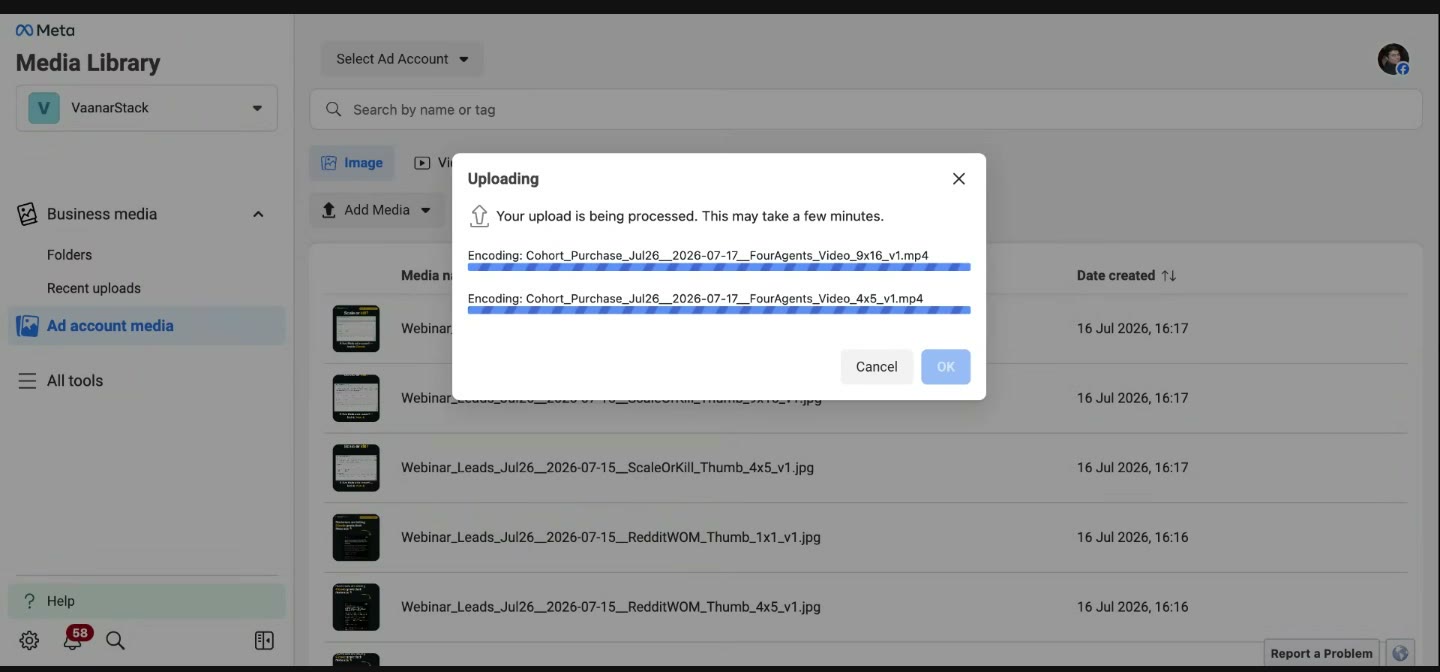
One thumbnail catch: when you upload through the media library (rather than Ads Manager), Meta doesn't auto-generate a thumbnail the way it normally would. It can auto-generate one, but that's an extra step — so it's cleaner to upload the thumbnail image too and let Claude use it.
It also needs a precise location ID
The other manual input is the location. Meta targets by an internal numeric location ID, and the MCP does not look it up for you — so if you hand it a place name and hope, you can get the wrong place. On our build we asked for Delhi NCR and the campaign came back targeting Egypt, and Meta's own audience-size check waved it through because Egypt is populous enough.
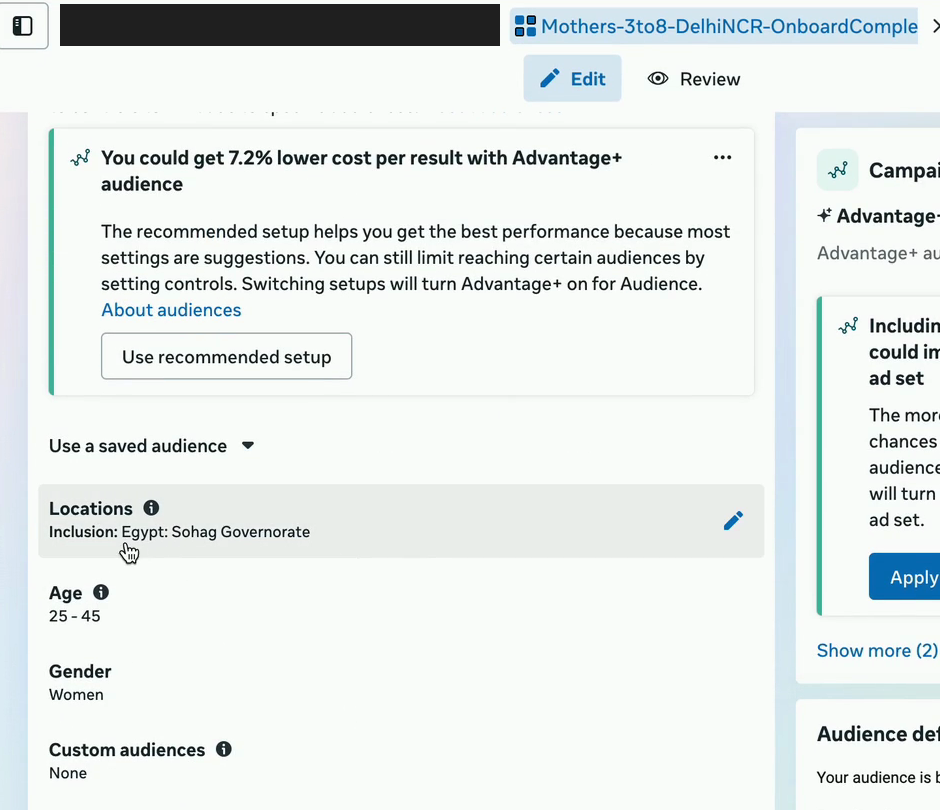
The fix is to give it the correct Meta location ID up front. We list verified India city keys and a copy-paste prompt in Meta Ads MCP: location targeting not working — use those instead of a place name and the location lands right the first time.
What it switches on without asking
Advantage+ Audience defaults ON
On the live build, Advantage+ Audience was turned on without us asking — and Advantage+ Placements too. For some accounts that is fine; for others it quietly overrides the targeting you want. We had to explicitly instruct it to "switch off both audience and placement." Before you let it create anything, say what you want off:
- Advantage+ Audience — off, unless you deliberately want broad targeting.
- Advantage+ Placements — off, if you are hand-picking placements.
- Confirm the budget and bid strategy it chose before you activate.
Always check the result in Ads Manager
The MCP will tell you it created the campaign. It cannot confirm Meta applied everything the way it reported — it has no way to read back and verify its own write. So the last step is yours: open Ads Manager and check the event, ad set, budget, and especially the targeting before it goes live. This is exactly the class of gap we check for when we audit Meta accounts — the settings a tool reports as done that never actually took.
FAQ
Can Claude launch Facebook ads for me?
Yes, semi-manually, through Meta's official Ads MCP. You give it a written campaign brief (a markdown file) and it builds the campaign, ad set, and ad from it. You still upload the creative to your Meta media library once (or give a hosted URL) so it can match the asset by hash, and you supply the correct Meta location ID. It can't verify its own writes, so check the result in Ads Manager.
How does Claude know what campaign to build?
From a documented brief. You write the campaign details in a markdown file (a brief.md), often alongside shared guidelines and a geo-keys file, and Claude reads those first, then creates the campaign to match. It gets the setup right because it's written down — write the brief well and the structure comes out correct.
How do I get my ad image or video into a Meta campaign with Claude?
Upload it to your Meta media library once — Business Manager, All Tools, Media Library, your ad account, Ad account media — or point Claude at a hosted image or video URL. The MCP then reads the media library and matches your asset by its hash. It does not upload files for you. Tell it the asset is already in Meta, or it will look in your local folder first.
Does Claude turn on Advantage+ automatically?
On our live build it turned on Advantage+ Audience and Advantage+ Placements without being asked, which can override your intended targeting. Explicitly tell it to switch both off in your prompt if you are hand-picking audience and placements.
Did Claude actually create my campaign correctly?
Verify it. The MCP reports success but can't read back what Meta applied — we've seen it set a wrong location (Delhi came out as Egypt). Open Ads Manager and check the event, ad set, budget, and targeting before it spends.
