Meta Ads MCP: Location Targeting Not Working
Why does the Meta Ads MCP get the location wrong?
Because it writes the location from a place name it never verifies, and Meta targets by a numeric key instead. Meta identifies a location by an internal ID (a number like 1023040 for Delhi), and these keys are not guessable — they are not the GeoNames IDs people assume. The MCP does not look the key up or expose it, so if you say "Delhi" and it resolves to the wrong key, the campaign targets the wrong place and still reports success.
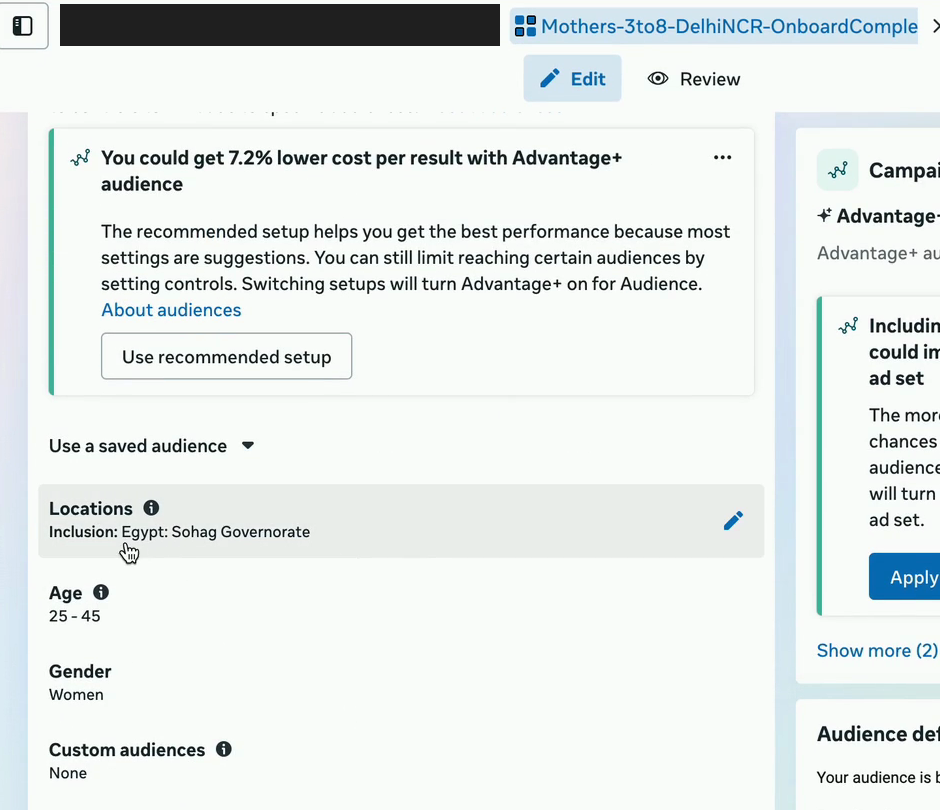
Here is the failure that makes this real. On a live build we asked for Delhi NCR; the campaign came back targeting Egypt. A wrong-but-populous key sails through Meta's audience-size check, so nothing errors — it just quietly spends on the wrong country.
The fix: give it the exact location key
Supply Meta's numeric key instead of a name and the guessing stops. Paste this straight into Claude (or your agent's instructions) before you create a Meta campaign — it carries the verified keys for the 12 biggest India cities, tells the MCP exactly how to make the call, and covers what to do for a city that isn't listed.
When setting Meta ad location targeting through the MCP, do NOT pass a place name.
Pass Meta's numeric location key (geo key), AND set location_types to "home"
(people who LIVE there, not recently-in / travelling). Use these verified India keys:

Delhi            = 1023040
Mumbai           = 1035921
Bengaluru        = 1017930
Gurgaon/Gurugram = 1026297
Noida            = 2678292
Faridabad        = 1024627
Ghaziabad        = 1025436
Pune             = 1039952
Hyderabad        = 1027234
Chennai          = 1021534
Kolkata          = 1020734
Ahmedabad        = 1015741

Set geo_locations on the ad set like this (Delhi example):
{ "cities": [ { "key": "1023040", "radius": 25, "distance_unit": "mile" } ],
  "location_types": ["home"] }

If a city is not listed, fetch its key with Meta's adgeolocation search first,
read it back to me, and confirm before creating the ad set.
After the ad set is created, show me the resolved Locations so I can verify in Ads Manager.
The keys are set for a 25-mile radius, a sensible metro default; adjust to your needs. With the key supplied, the MCP writes the location deterministically instead of guessing from a name.
Why the "obvious" location IDs are all wrong
Two sets of numbers look like they should work. Both fail, and they fail in different ways — which is worth knowing because the failure modes look nothing alike from the outside.
GeoNames IDs are a different namespace entirely
The IDs most people reach for first are GeoNames IDs, because they are public and easy to find:
Delhi 1273294, Mumbai 1275339, Bengaluru 1277333. In Meta's
namespace those same numbers are villages in South Korea. The ad set created
without complaint and reported an audience of roughly 6–7 million people, because a 20–25
mile radius around Seoul genuinely does contain that many. A completely wrong location produced a
completely plausible number.
A second set resolves to real cities — just tiny ones
Another commonly circulated set (2045161, 2047035, 2045585)
is recognised by Meta as city-type keys, so they do not error as invalid. They resolve to tiny
localities, so the audience reads as effectively empty and you get error
#2446395 — the "broaden your audience" message. That one at least
fails loudly. We tried it under every knob we could think of: conversions and link-click objectives,
Advantage+ audience on and off, with and without an age range, single-city at a 50-mile radius. Same
result every time, because the key was the problem and nothing else was.
A passing create does NOT confirm the city
This is the part to take away. The API returns no resolved location name. A
successful ads_create_ad_set or ads_update_entity tells you the request
was well-formed — not that it points where you meant. A wrong key that happens to land
somewhere populous clears every check the API performs. Only trust a key that Meta's
adgeolocation endpoint resolved with a matching name, region and country.
Also set the location type to "home", not "recently in"
One more line saves a separate headache. Meta lets you target people who live in a location ("home") or who were merely recently in or travelling in it. If you set geo without specifying, it defaults to include the now-removed "recently in / travelling in" option — and that has two consequences: you target people who aren't actually residents, and Meta's Publish button throws error #1870194 because that option was retired with no UI control left to fix it. Both bit us.
The fix is to always set location_types: ["home"] on the ad set (it's already in the copy-paste block above). Two things we learned the hard way:
- If the draft still won't publish after the fix, activate via the API rather than the UI Publish button — API activation skips the validator and a clean home-only ad set goes live.
- Don't edit the Locations in the UI later. Editing a city in the interface re-injects the deprecated option and brings #1870194 back with no UI fix. Budget, age, and creative edits are safe in the UI; change cities via the API.
How to look up a location key you don't have
The connector has no geo-search tool, so this lookup happens outside it — against Meta's
Graph API search endpoint with type=adgeolocation, filtered to
location_types=["city"] and the country you want. Ask for the city by name
and read back what it resolves to.
Accept a key only when all three fields match what you asked for:
- Name — and note Meta's spelling may differ from yours. Gurgaon comes back as "Gurugram", Bengaluru as "Bangalore". That is fine; a different city is not.
- Region — the state. This is the field that catches the wrong-country failures instantly.
- Country — obvious, and the one nobody checks.
Then write it into your keys file so you never look it up twice.
Verified India city keys
| City | Meta key | Meta's name for it | State |
|---|---|---|---|
| Delhi | 1023040 | Delhi | Delhi |
| Mumbai | 1035921 | Mumbai | Maharashtra |
| Bengaluru | 1017930 | Bangalore | Karnataka |
| Gurgaon | 1026297 | Gurugram | Haryana |
| Noida | 2678292 | Noida | Uttar Pradesh |
| Faridabad | 1024627 | Faridabad | Haryana |
| Ghaziabad | 1025436 | Ghaziabad | Uttar Pradesh |
| Pune | 1039952 | Pune | Maharashtra |
| Hyderabad | 1027234 | Hyderabad | Telangana |
| Chennai | 1021534 | Chennai | Tamil Nadu |
| Kolkata | 1020734 | Kolkata | West Bengal |
| Ahmedabad | 1015741 | Ahmedabad | Gujarat |
Resolved via adgeolocation on Graph v23.0, July 2026. Keys are stable, but re-verify
one if a campaign ever behaves oddly rather than assuming the list is eternal.
"Delhi NCR" is five cities, not one
There is no NCR key. Targeting the National Capital Region means listing Delhi, Gurgaon, Noida, Faridabad and Ghaziabad as five city entries in the same array. Radius guidance that has worked for us: about 25 miles on Delhi, 15 on the satellite cities so they do not overlap into each other and inflate frequency, and 20 on other metros.
Read back what the ad set is actually targeting
This changed in July 2026 and it is worth knowing, because most write-ups on this still say
otherwise. Reading an existing ad set's targeting field used to return
"unsupported field" — you could write geo targeting through the connector but not
inspect it. That field now returns the full targeting spec, verified on a live account.
The practical effect: you can ask the assistant what an ad set is currently targeting and get the actual keys back, which turns verification from a tab-switch into a question. Two things this makes easy that were awkward before:
- Auditing an inherited account. Ask for the geo spec on every active ad set at once and look for keys that do not appear in your verified list.
- Confirming your own write immediately. Create the ad set, read the targeting back, and compare the key against what you sent — before anything spends.
What still does not exist inside the connector is geo search. You can read a key that is
already set; you cannot ask it to find you a new one. That lookup remains an
adgeolocation call outside the MCP.
Build your own city-key reference (and let Claude grow it)
The keys above are the start of a reusable asset. What works in practice — and how we run it — is to keep a small keys-and-learnings file as knowledge you feed the agent every time (ours is a meta-location-targeting-learnings.md). When you need a city that isn't in it, have Claude fetch the key once via Meta's adgeolocation search, confirm it, and append it. Over a few campaigns the list covers everywhere you advertise and the guessing stops entirely. The reference is the moat, not the connector: the MCP is the same for everyone; your verified key list is what makes it reliable for your accounts.
Verify the location in Ads Manager once
Do one check after the ad set is created: confirm the location is the city you meant, not just that the call returned success. You can now do this two ways — read the targeting back through the connector (see above), or open Ads Manager and look. With the right key and location_types: ["home"] going in, this is a quick confirmation rather than a debugging session — but do it every time before the campaign spends. Getting location right the first time is the kind of thing we bake into every Meta account we audit. Related: can Claude create and launch a Meta ad campaign? and the Meta Ads MCP overview.
Frequently asked questions
Why is Claude setting the wrong location on my Meta ad?
Because Meta targets by a numeric location key (not the guessable GeoNames ID) and the Meta Ads MCP doesn't look it up — if you pass a place name it can resolve to the wrong place, and a wrong-but-populous key passes Meta's audience check without erroring. We asked for Delhi and got Egypt. The fix is to pass the exact Meta location key (Delhi = 1023040), not the name.
What are the Meta location IDs for Indian cities?
Verified keys for the 12 biggest India cities: Delhi 1023040, Mumbai 1035921, Bengaluru 1017930, Gurgaon 1026297, Noida 2678292, Faridabad 1024627, Ghaziabad 1025436, Pune 1039952, Hyderabad 1027234, Chennai 1021534, Kolkata 1020734, Ahmedabad 1015741. Pass the key with a radius and set location_types to home.
What is location_types home in Meta targeting?
It targets people who live in the location, rather than those merely recently in or travelling through it. If you don't set it, Meta defaults to the now-removed 'recently in / travelling in' option, which mistargets non-residents and triggers publish error #1870194. Always set location_types to ['home'] on the ad set.
How do I find a Meta location key that isn't in the list?
Have Claude fetch it via Meta's adgeolocation search, read the key back to you, and confirm it before creating the ad set — then add it to your own city-keys reference so it's there next time.
Why did my Meta ad set target the wrong country even though it was created successfully?
Because a successful create only means the request was well-formed. The API returns no resolved location name, so a wrong-but-populous key passes every check it performs. GeoNames IDs for Delhi, Mumbai and Bengaluru are villages in South Korea in Meta's namespace, and a 20-25 mile radius around Seoul reports an audience of 6-7 million - a completely wrong location producing a completely plausible number.
Are GeoNames IDs the same as Meta location keys?
No, and this is the single most common cause of this bug. They are different namespaces that happen to both use numeric IDs. The GeoNames IDs for Delhi (1273294), Mumbai (1275339) and Bengaluru (1277333) resolve to entirely different places inside Meta. Only use a key that Meta's own adgeolocation endpoint returned with a matching name, region and country.
How do I target Delhi NCR in Meta ads?
There is no single NCR key. List five cities in the same array - Delhi 1023040, Gurgaon 1026297, Noida 2678292, Faridabad 1024627 and Ghaziabad 1025436 - each with its own radius. About 25 miles on Delhi and 15 on the satellites works well, since larger radii on the satellite cities overlap into each other and inflate frequency.
Can I check what location an ad set is currently targeting through the MCP?
Yes, since July 2026. Reading an ad set's targeting field used to return 'unsupported field', but it now returns the full targeting spec, so you can ask what an ad set is targeting and get the actual keys back. What still does not exist inside the connector is geo search - you can read a key that is already set, but finding a new one is still an adgeolocation call made outside the MCP.
FAQ
Why is Claude setting the wrong location on my Meta ad?
Because Meta targets by a numeric location key (not the guessable GeoNames ID) and the Meta Ads MCP doesn't look it up — if you pass a place name it can resolve to the wrong place, and a wrong-but-populous key passes Meta's audience check without erroring. We asked for Delhi and got Egypt. The fix is to pass the exact Meta location key (Delhi = 1023040), not the name.
What are the Meta location IDs for Indian cities?
Verified keys for the 12 biggest India cities: Delhi 1023040, Mumbai 1035921, Bengaluru 1017930, Gurgaon 1026297, Noida 2678292, Faridabad 1024627, Ghaziabad 1025436, Pune 1039952, Hyderabad 1027234, Chennai 1021534, Kolkata 1020734, Ahmedabad 1015741. Pass the key with a radius and set location_types to home.
What is location_types home in Meta targeting?
It targets people who live in the location, rather than those merely recently in or travelling through it. If you don't set it, Meta defaults to the now-removed 'recently in / travelling in' option, which mistargets non-residents and triggers publish error #1870194. Always set location_types to ['home'] on the ad set.
How do I find a Meta location key that isn't in the list?
Have Claude fetch it via Meta's adgeolocation search, read the key back to you, and confirm it before creating the ad set — then add it to your own city-keys reference so it's there next time.
Why did my Meta ad set target the wrong country even though it was created successfully?
Because a successful create only means the request was well-formed. The API returns no resolved location name, so a wrong-but-populous key passes every check it performs. GeoNames IDs for Delhi, Mumbai and Bengaluru are villages in South Korea in Meta's namespace, and a 20-25 mile radius around Seoul reports an audience of 6-7 million - a completely wrong location producing a completely plausible number.
Are GeoNames IDs the same as Meta location keys?
No, and this is the single most common cause of this bug. They are different namespaces that happen to both use numeric IDs. The GeoNames IDs for Delhi (1273294), Mumbai (1275339) and Bengaluru (1277333) resolve to entirely different places inside Meta. Only use a key that Meta's own adgeolocation endpoint returned with a matching name, region and country.
How do I target Delhi NCR in Meta ads?
There is no single NCR key. List five cities in the same array - Delhi 1023040, Gurgaon 1026297, Noida 2678292, Faridabad 1024627 and Ghaziabad 1025436 - each with its own radius. About 25 miles on Delhi and 15 on the satellites works well, since larger radii on the satellite cities overlap into each other and inflate frequency.
Can I check what location an ad set is currently targeting through the MCP?
Yes, since July 2026. Reading an ad set's targeting field used to return 'unsupported field', but it now returns the full targeting spec, so you can ask what an ad set is targeting and get the actual keys back. What still does not exist inside the connector is geo search - you can read a key that is already set, but finding a new one is still an adgeolocation call made outside the MCP.
