Official vs Community MCP: Which Should a Marketer Use?
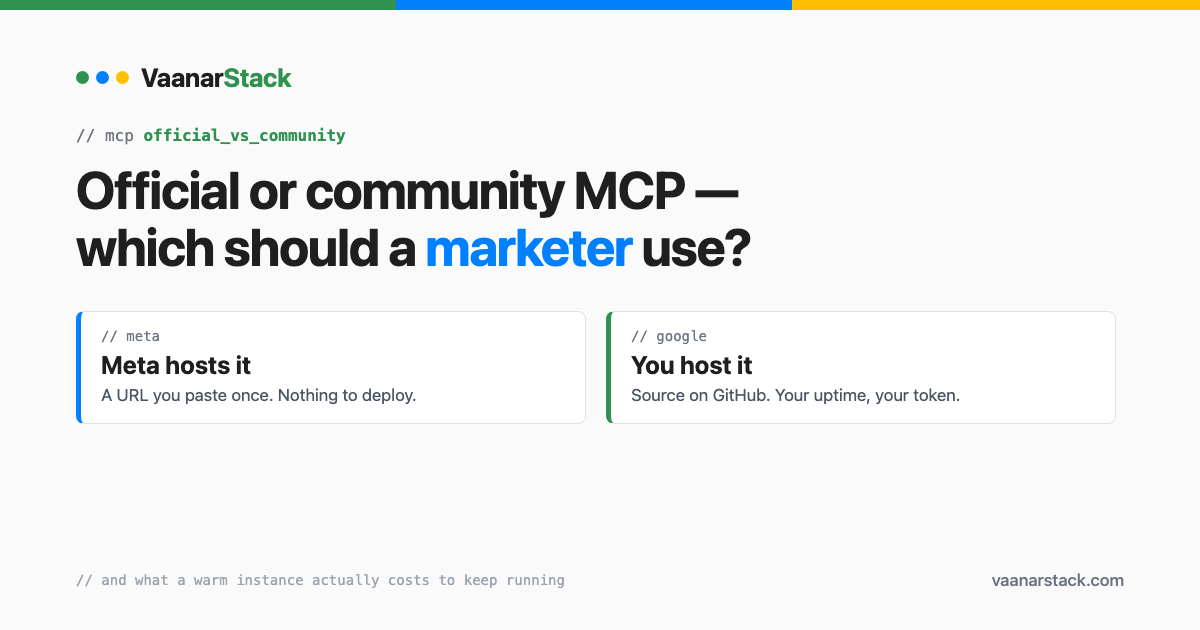
Use the official one wherever it exists. For the Meta Ads MCP that is a hosted URL you paste in once and never maintain. For Google there is no hosted official option at all — so a self-hosted or community server is the only route, and that buys you write access at the price of running a server. That is the whole official vs community decision for most marketers, and everything below is the detail behind it.
What does "official" actually mean here?
Meta hands you a URL. Google hands you a repo.
This is the difference people underestimate, and it is structural rather than cosmetic:
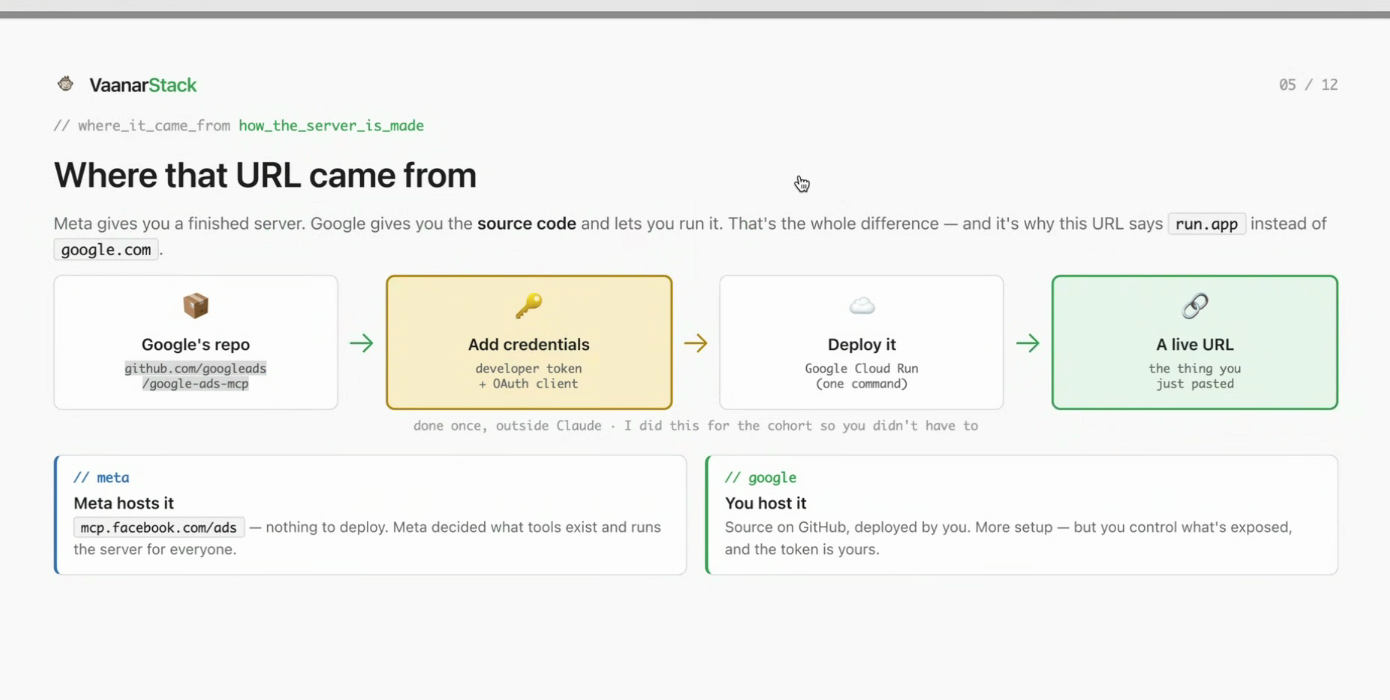
Meta decided what tools exist and runs the server for everyone. With Google you clone source, attach your own credentials, deploy it somewhere, and the endpoint you paste into Claude is one you now own and operate. Four steps versus one, and the four are permanent responsibilities rather than a one-time setup.
Official does not mean complete
Worth saying plainly, because "official" gets read as "full-featured". Meta's connector has real gaps that move over time — ad-set targeting only became readable in July 2026, having previously returned an unsupported-field error. Several fields still do not come back at all, including the ones that would let you read an ad's destination URL. You can create an ad through the connector and then be unable to read back where it points.
Meta's Ads MCP: pros and cons
| Pros | Cons |
|---|---|
| Hosted by Meta — paste a URL, nothing to deploy or patch | You get the tools Meta decided to expose, and no others |
| Read and write: it can create campaigns, ad sets and ads | Real read gaps remain — you cannot read an ad's destination URL |
| Free, and works from Desktop or Cowork without a developer setup | Rollout is gated per account, and you cannot force it on |
| Per-tool permissions, so writes can be approval-gated | The connector cannot verify its own write — you must check after |
| No credentials of your own to store or rotate | If Meta changes the tool surface, your workflow changes with it |
Google's Ads MCP: pros and cons
Different shape entirely, and the read-only limit is the headline.
| Pros | Cons |
|---|---|
| Open source — you can read exactly what it does before running it | Officially read-only: three tools, and all three read |
| You control what is exposed and where it runs | No hosted URL — you must deploy and keep it running yourself |
| The developer token is yours, not shared | Three credentials to obtain before anything works |
| Community forks add the write access Google withholds | A community fork means someone else's code holding your credentials |
| Works across accounts under different managers | A warm instance costs real money every month (below) |
The credential requirement is the part that stalls most setups, because three separate things are involved and they answer three different questions:
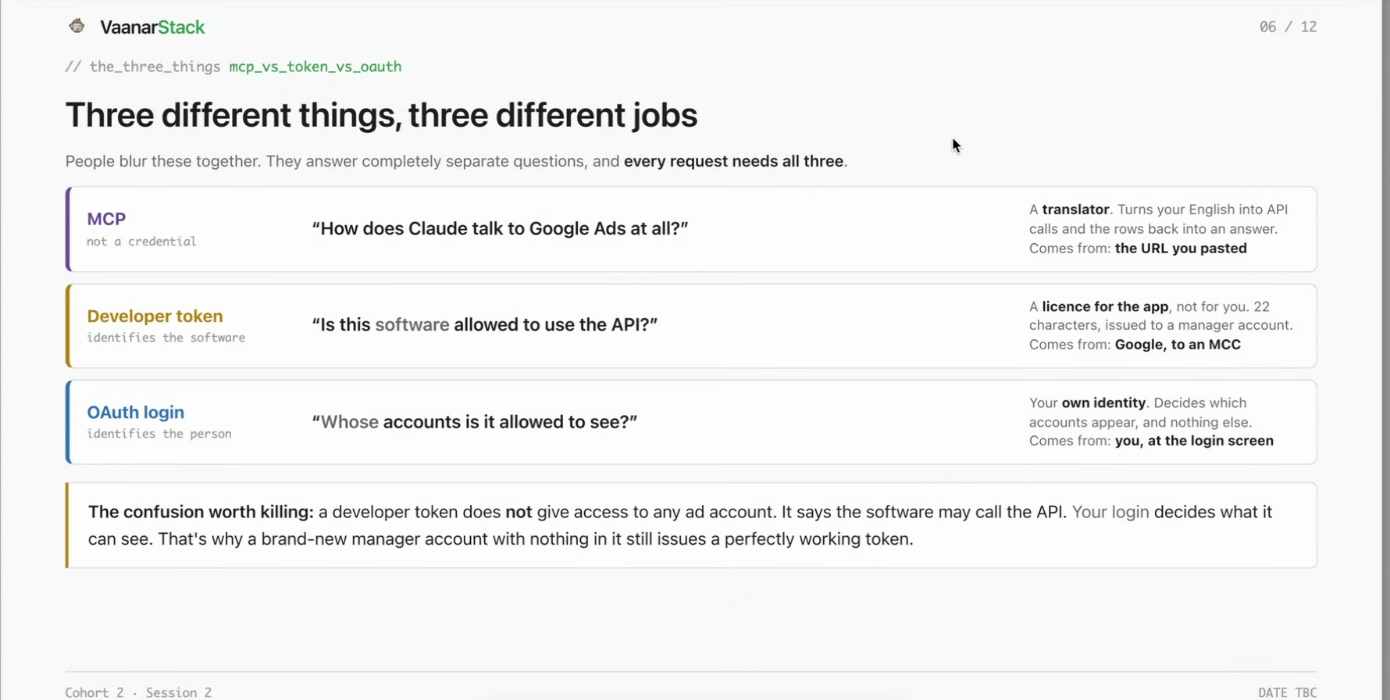
The confusion worth killing: a developer token does not grant access to any ad account. It says the software may call the API. Your login decides what it can see. We unpack that in whether you need an MCC for the Google Ads MCP, and the read-only limit in can the Google Ads MCP create campaigns.
Are community MCPs safe to use?
Sometimes. "Community" is not a synonym for unsafe, but it does mean nobody is contractually responsible for it. Here is how to judge one in about ten minutes.
Stars and forks are your first proxy
They are crude and they are still the fastest signal you have. A server with meaningful star and fork counts has had more eyes on the code, is more likely to be patched when an API version is deprecated, and is more likely to have someone else already hit the bug you are about to. A repo with a handful of stars and no forks is a project of one, and you are trusting that one person's availability with your ad account credentials.
Check the shape of activity too, not just the totals: recent commits, issues that get answered, and whether releases track the platform's API versions.
Does it handle rate limits properly?
This is the check almost nobody runs and it separates a serious server from a weekend project. Both Meta and Google throttle aggressively, and the platforms return usage headers telling you how close you are. A well-built MCP reads those headers and backs off. A naive one retries hard, burns through your quota, and gets the account throttled — and because a throttled response often looks like an empty result rather than an error, you can end up reading a report full of zeros and believing it.
Before you connect one, look for explicit rate-limit or backoff handling in the source. If there is none, assume it will fail loudly at the worst time, or quietly at a worse one.
The three questions to ask before you connect one
- What credentials does it hold? A server with your developer token and OAuth client is holding the keys to every account your login can reach.
- Where does it run? Your own infrastructure is a very different risk profile from someone else's hosted endpoint.
- Who can push to it? If you are running someone's hosted instance, their next deploy is your next deploy.
The permission setting that contains the risk either way
Whichever you choose, the containment is the same: put read-only operations on always-allow, and require explicit approval for every write and delete. That single split means a misbehaving server — official or community — can waste your time but cannot spend your money without you clicking.
What does a self-hosted server actually cost to keep running?
The bill nobody quotes
Our own hosted Google Ads MCP keeps sign-in state in memory. That means it cannot scale to zero: if the instance stops, everyone using it is signed out. Keeping one warm runs about Rs 850 a month, purely so people stay logged in. It is not a large number, but it is a permanent one, and no tutorial mentions it because tutorials end at "it works on my machine".
The protocol changed in July 2026 and started a clock
The MCP specification updated on 28 July 2026: protocol-level sessions were removed and the older dynamic client registration was deprecated with a twelve-month window. If you self-host, that window is yours to manage. If you use Meta's hosted connector, it is Meta's problem. That asymmetry is the real argument for official-where-available.
What if the official connector is not switched on for you?
You may hit is_ads_mcp_enabled: false. This is a rollout gate, not a mistake you made. There is no setting, no form and no support path that flips it — it is availability, and it arrives when it arrives. In the meantime a community server is the only route, which is the one case where community wins by default rather than by preference.
The decision, in one table
| Your situation | Use | Why |
|---|---|---|
| Meta ads, and the connector is enabled | Official | Hosted, free, read and write, nothing to maintain |
| Meta ads, connector not yet enabled | Community, temporarily | The gate is not something you can influence |
| Google Ads, analysis only | Official, self-hosted | Read-only is sufficient, and the code is auditable |
| Google Ads, you need to make changes | Community | Official reads only; write access exists nowhere else |
| You cannot own a running server | Meta official only | Google's route has no zero-maintenance option |
For the fuller capability picture on each, see what the Meta Ads MCP can and cannot do and the Google Ads MCP equivalent.
FAQ
Are community MCPs safe to use?
They can be, but nobody is accountable for them. Judge one on stars and forks as a first proxy for how many eyes are on the code, then check whether it actually handles Meta and Google rate limits with proper backoff. Then ask what credentials it holds, where it runs, and who can push to it. Whatever you conclude, keep writes behind explicit approval.
Is the official Meta Ads MCP free?
Yes. It is hosted by Meta, there is nothing to deploy, and there are no credentials of your own to store. The costs in this comparison all sit on the Google side, where you host the server yourself.
Why is there no official Google Ads MCP URL to paste?
Google ships its Ads MCP as source code rather than a hosted service. You clone it, attach your developer token and OAuth credentials, deploy it, and use your own endpoint. Budget an hour rather than two minutes, and see our Google Ads connection walkthrough.
Can a community MCP create Google Ads campaigns?
That is precisely what they exist for. Google's official server exposes three tools and all three read, so any write path is a community or self-hosted one — along with the credential, uptime and patching responsibilities that come with it.
What happens if a community MCP stops being maintained?
It works until an API version is deprecated, then it breaks. This is why fork count matters more than star count: forks mean someone else can carry it, or you can. The July 2026 protocol change put a twelve-month clock on one older authentication pattern, and unmaintained servers are exactly the ones that will not be updated in time.
If you would rather see what a connector actually surfaces before choosing one, our free ads audit runs against your account and shows you the output.
