Claude Google Ads Skill: What Can It Automate, and Where Does It Break?
A Claude Google Ads skill is a markdown file that tells Claude how to run one recurring job against your Google Ads data: what to pull, in what order, what threshold turns a number into a finding, and how to present the answer. No code. The MCP connector is the connection; the skill is the method. The connector can already read your account — the skill is what stops you re-explaining your analysis every Monday morning.
That distinction is the whole post. Below: what a skill can genuinely automate, what you need before one will run at all, and the four places ours has broken in production.
How is a skill different from an MCP connector?
People use the two words interchangeably and then wonder why connecting the MCP didn't give them an audit. It's worth separating them properly.
| MCP connector | Skill | |
|---|---|---|
| What it is | A server that translates your English into Google Ads API calls | A markdown file describing one repeatable job |
| Who writes it | Google (or a community maintainer) | You |
| What it knows | The API surface. Nothing about your account or your standards | Your thresholds, your reporting order, your definition of "a problem" |
| When it runs | Whenever you ask a question | On a schedule, or on one command |
The connector is a query engine, not an analyst
Google's official Google Ads MCP exposes three tools, and all three of them read. That is deliberately a small surface — it is a way to ask the API questions, not a system that knows which questions are worth asking. Point it at an account and ask "how are we doing" and you will get a competent data dump and no decision. We cover the read-only limit in detail in whether the Google Ads MCP can create campaigns.
The skill is where your judgement lives
A skill file is unglamorous. It is steps, field lists, formulas and the notes that stop the run going wrong. Here is a real one of ours — this is the Meta creative-audit skill rather than the Google Ads one, but the anatomy is identical and it shows the shape better than a description would:
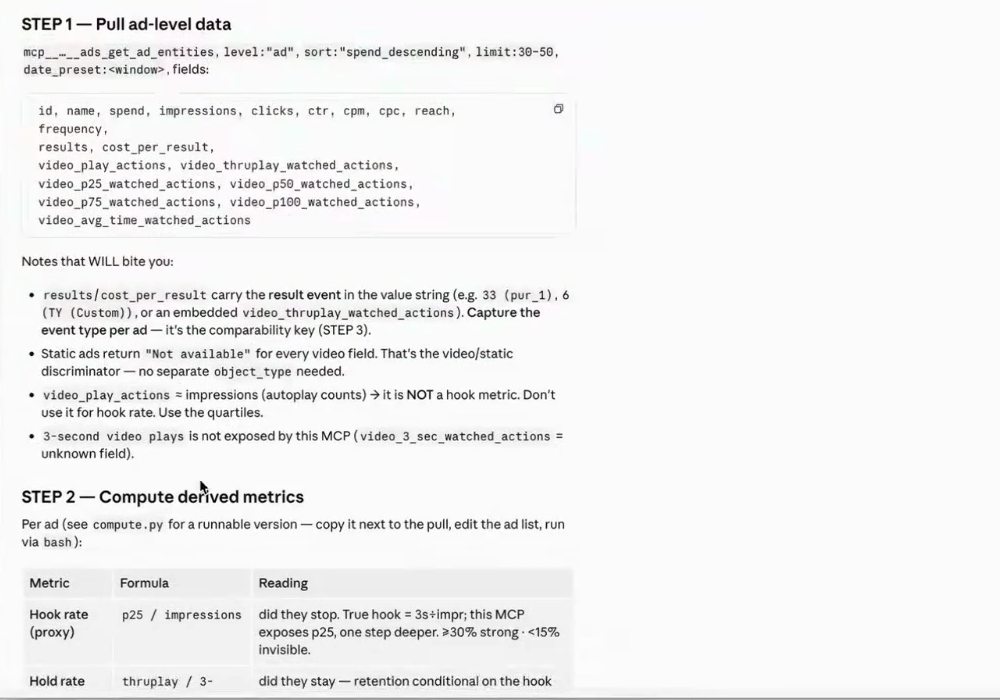
Note what is actually in there: an explicit field list so the pull is identical every week, a "Notes that WILL bite you" section recording things we got wrong once, and a formula table so the derived metrics are computed the same way every time. That last part is the point. Ask a model to "work out hook rate" on Monday and again on Friday and you can get two different definitions. Write the formula in the file and you get one.
What do you need before a Google Ads skill will run?
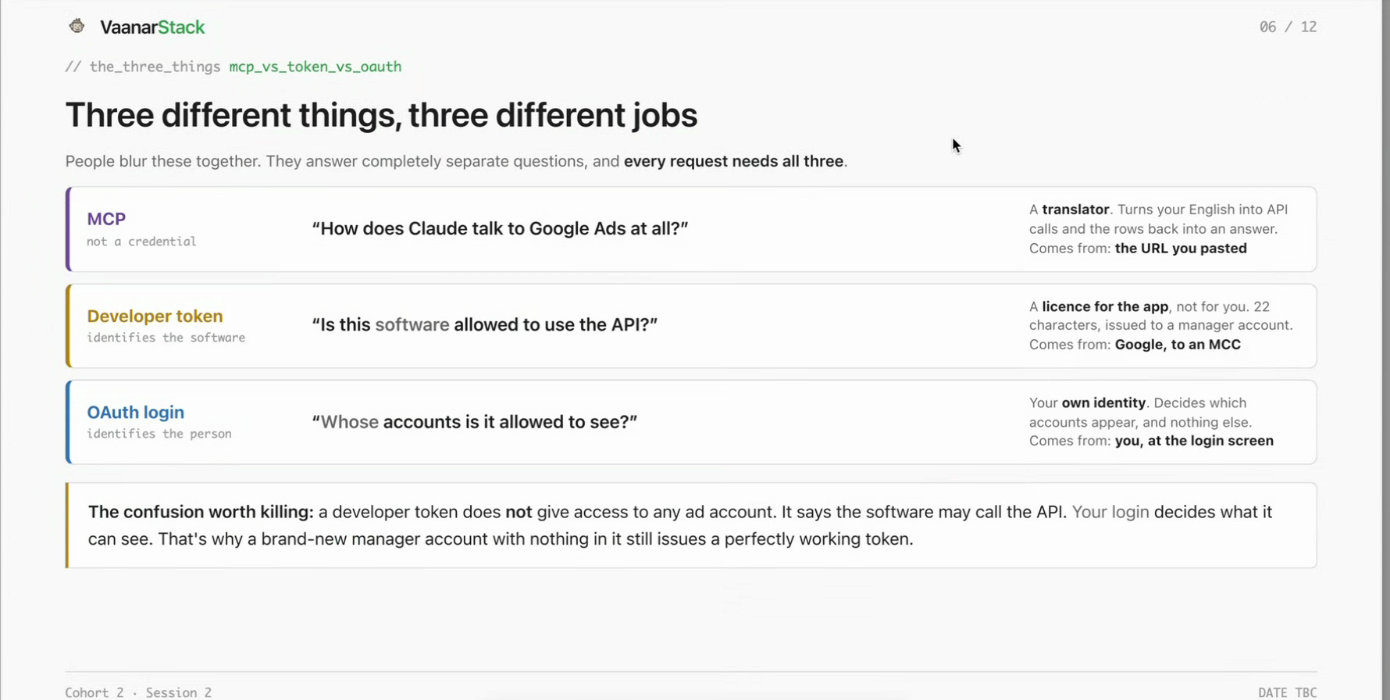
This is the part that stops most people, and it has nothing to do with the skill file. Google Ads is materially harder to connect than Meta, and three separate credentials are involved. They answer three different questions, and people blur them together constantly:
1. A manager (MCC) account, to get a developer token
The developer token is issued to a manager account and it licences the software to call the Google Ads API at all. It is not account access. A brand-new manager account with nothing inside it still issues a perfectly working token. If you are unsure whether you need one, we wrote that up separately in do you need an MCC for the Google Ads MCP.
2. Google OAuth credentials, via Google Cloud
OAuth identifies you, and it is what decides which ad accounts are actually visible. This is the credential that determines reach, not the developer token — which is why you can connect accounts sitting under different managers as long as your login can see them.
3. The MCP itself, installed and connected
Google ships its Ads MCP as a repository you host, not a URL you paste. Budget an hour, not two minutes. The full walkthrough is in how to connect Google Ads to Claude.
Only once those three are in place does a skill file do anything at all. A skill on top of a broken connection just fails more consistently.
What can a Google Ads skill actually automate?
Three things the connector alone will not do.
A scheduled audit that arrives written, not as a dashboard
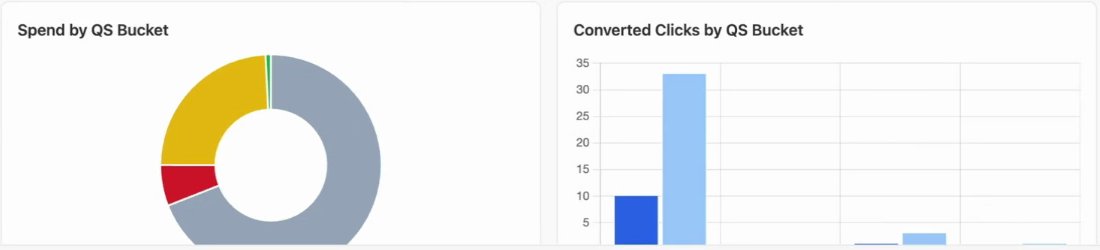
A dashboard shows you numbers and leaves the reading to you. A skill can carry the reading. Our quality-score routine, for instance, does not just print an average — it states the finding first: that every scored keyword is flagged Below Average on landing page, and that most of the converting keywords have no quality score at all.
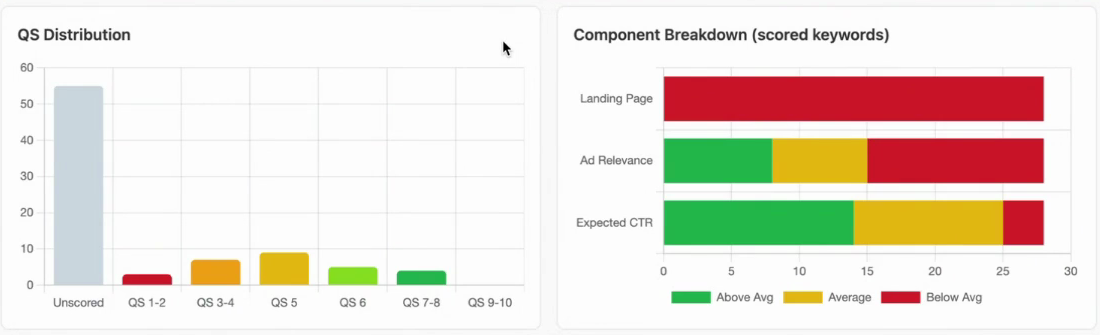
The left chart is the one people miss. The tallest bar is Unscored — keywords Google has not finalised a quality score for. Average them in and you get a number that describes nothing.
Ranking findings by money, not by count
A generic audit will tell you that 3,000 keywords have a low quality score. That is technically true and useless if none of them spend. The version worth reading buckets spend by score band, so the fix list is ordered by what it actually costs you:
Naming the cause, not restating the metric
"CPA is up 40%" is a metric. "CPA is up because CPM rose while CTR held" is a cause. The difference is a decomposition written into the skill file once, rather than reasoned out fresh each time.
Can I build a Google Ads skill without coding?
Yes, and this is the part people do not believe until they watch it. You are writing a brief, not a program.
The five questions a harness has to answer
Every workable skill answers the same five: objective, facets, order, guardrails, detail. Here is that being typed into Claude live, in a cohort session, as plain English:

That prompt is the entire input. No code, roughly ten minutes, and the output is a markdown file you can re-run every week.
Guardrails are the part people skip
Without a trigger you get ten dials and no decision. "Flag any ad group where more than 30% of spend sits below quality score 6" is a guardrail. "Show me quality score" is not. If your skill produces a report you still have to interpret, you have built a slower dashboard.
Where do Google Ads skills break?
This is the section other write-ups skip, so it is the one worth reading. All three of these are ours, in production, plus the limit that no amount of skill-writing gets around.
Keyword Planner is closed on an explorer-level developer token
Ask for search volume and you get DEVELOPER_TOKEN_NOT_APPROVED, a 403. There is no volume data on a starter token and no amount of prompting produces it. Plan the skill around what you can actually read — your own impressions, spend and quality scores — rather than around volume you will never get.
A query that filters on a field the select clause never references
GAQL will reject a query that filters on a field it did not select. The error string is explicit once you read it, but a model writing queries fluently will produce this repeatedly until the skill file says not to. This is exactly what the "notes that will bite you" section exists for.
Scheduled runs stall on a permission prompt instead of failing
Our most expensive failure, and the least obvious. An unattended run that hits a permission prompt does not error — it waits. Forever. You do not get an alert, because nothing failed. You find out when you notice the report never arrived. If you are going to schedule a skill, every tool it needs has to be pre-approved before the first unattended run, and read-only operations should be the only things on always-allow.
And read-only means it can never fix what it finds
Google's official MCP reads. It does not write. A skill can hand you a ranked list of changes; it cannot make them. That is a real limit and worth stating before anyone expects otherwise.
Can a skill run on a schedule?
Yes — with the caveat above. Scheduling is what turns a skill from a party trick into infrastructure: the audit arrives written on Monday whether or not you remembered to ask. But an unattended run only works if the permission surface was settled in advance. Read-only on always-allow; every write or delete on explicit approval.
Do I need Claude Code, or does Cowork work?
For Google Ads specifically, Claude Code is the easier home, because you are hosting the MCP yourself and the skill file sits on disk right next to it — the same place you are already working.
Meta's hosted connector is a different story. There is no server of yours for the skill to sit beside, so Cowork handles it comfortably, as we covered in connecting Meta Ads to Claude.
The short version: if the MCP is something you run, work where the files are. If it is something the platform runs for you, Cowork is enough.
Is there a ready-made Google Ads skill I can copy?
Not one we would hand over as-is, and honestly not one you should want. The value in a skill file is that its thresholds are yours. Ours says 30% of spend below quality score 6 because that is the line we argue for; yours might be different, and a copied file with someone else's thresholds is just a generic audit with extra steps.
What is worth copying is the shape: the five questions, an explicit field list, a formula table, and a notes section that grows every time something breaks. If you would rather see the output before you build anything, our free Google Ads audit runs this routine against your account and returns the written version.
FAQ
What can a skill automate that the connector can't?
The connector answers a question you ask. A skill carries the judgement: it fixes the field list so the pull is identical every week, writes the formulas so derived metrics are computed the same way each time, sets the thresholds that turn a number into a finding, and orders the output by money rather than by count. It also runs unattended, which a connector cannot do on its own.
Do I need a developer token to run a Google Ads skill?
Yes. The developer token is issued to a manager (MCC) account and licences the software to call the Google Ads API at all. It is separate from your OAuth login, which is what decides which ad accounts you can actually see. You need both, plus the MCP itself hosted and connected, before any skill file does anything.
Why did my scheduled Google Ads skill never produce a report?
The most likely cause is that the unattended run hit a permission prompt and stalled rather than failing. Nothing errors, so nothing alerts you — the run simply waits. Pre-approve every tool the skill needs before its first unattended run, and keep read-only operations on always-allow with writes on explicit approval.
Can a Google Ads skill change my campaigns?
Not through Google's official MCP, which exposes three tools and all three read. A skill can produce a ranked list of changes but cannot apply them. Write access needs a community or self-hosted MCP, which brings its own credentials, uptime and patching to manage.
