How to Connect Meta Ads to Claude (Step by Step)
How do you connect Meta Ads to Claude?
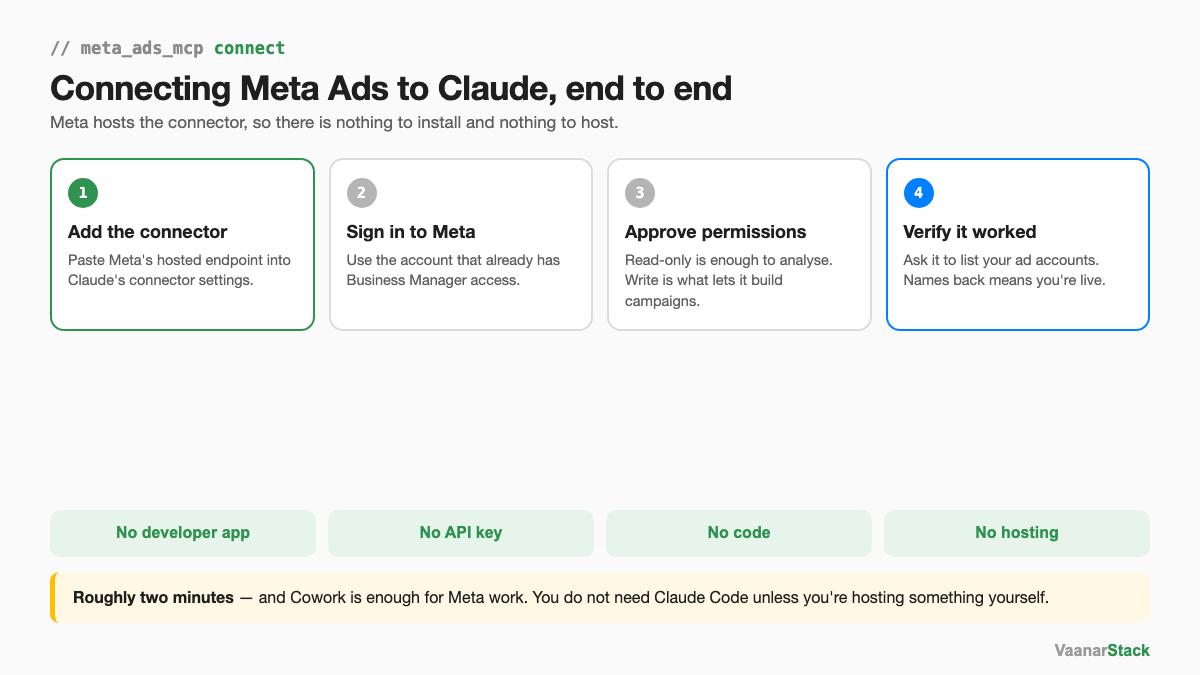
You add Meta's official connector, sign in with the account that already has Business Manager access, and approve the permissions. That's the whole thing. There is no developer app to register, no API key to generate, no server to host and no code to write — Meta hosts the connector itself, which is what makes this a two-minute job rather than an afternoon.
Yash put it plainly in our Meta Ads MCP webinar: "It's literally a two-minute job. You just need to come to this connector, add it, and then with your login, if you have a login into Meta's business manager, it will very easily connect."
What you need before you start
- A Facebook account with a role on the ad account you want to analyse
- Access to the Business Manager that owns it
- Claude — Cowork is enough, and we'll come back to why
That's the full list. If you can open the account in Ads Manager today, you can connect it.
Step by step: connect the Meta Ads MCP
Step 1 — Add the connector in Claude
Open Claude's connector settings and add Meta's hosted endpoint, mcp.facebook.com/ads. Because it's hosted by Meta, there is nothing to clone, install or keep running. This is the part that differs sharply from Google, which ships its Ads MCP as a repository you host yourself.
Step 2 — Sign in and pick the right Business Manager
You'll be sent to Meta to authorise. Sign in with the account that already has access, and if you sit across several Business Managers, choose deliberately here. This single choice determines which ad accounts Claude can see afterwards, and it's the most common cause of a connection that technically works but shows the wrong data.
Step 3 — Approve permissions
Meta will list what the connector is asking for. Worth understanding the split rather than clicking through: read access is all you need to pull spend, creative metrics and audience breakdowns — everything analytical. Write access is what lets Claude create and change campaigns. If you only want analysis, you don't need to grant more than read.
Step 4 — Verify with a first query
Don't assume it worked because nothing errored. Ask Claude to list your ad accounts. If names come back, you're connected. If the list is empty or unfamiliar, you're on the wrong Business Manager — go back to step 2.
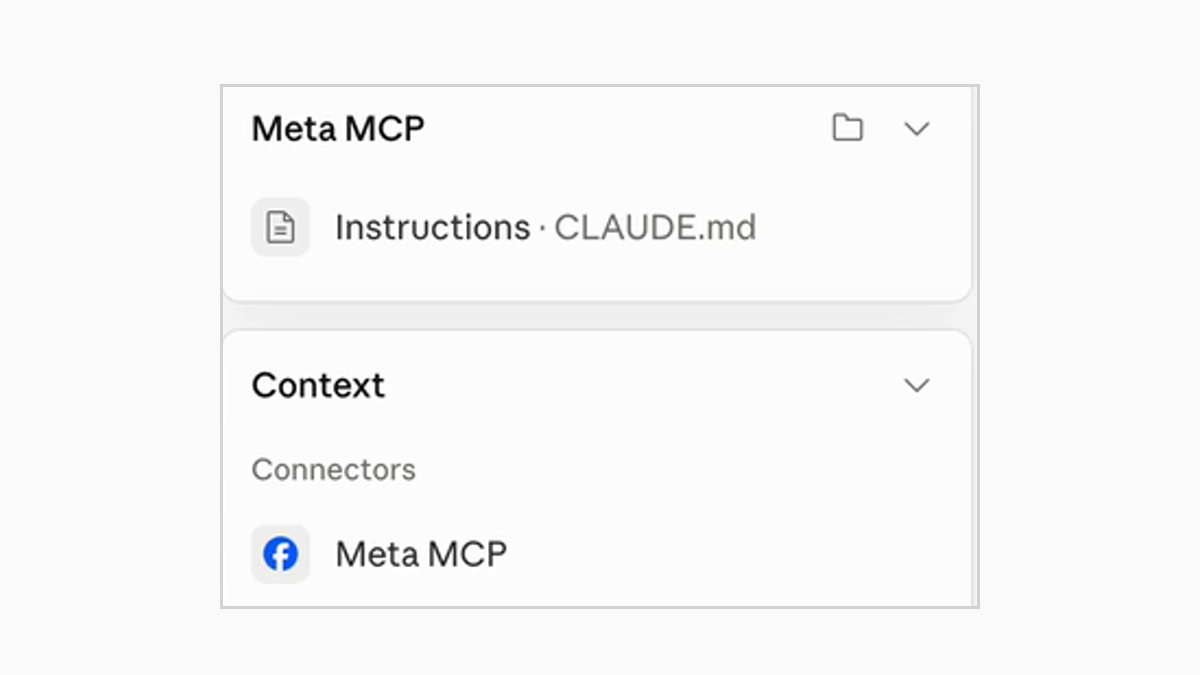
Once it's attached, the connector shows up in Claude's context panel, which is the quickest way to confirm at a glance that it's live:
Which Claude do you need — Desktop, Cowork or Code?
For Meta work, Cowork is enough
This trips people up more than the connection itself. Claude Code looks like the serious option, so people assume ad work requires it. It doesn't. The Meta connector is hosted, so there's nothing to run locally — Cowork handles the entire analytical workflow, including building dashboards and reports.
Claude Code earns its place when you're hosting something yourself, wiring up OAuth, running scheduled jobs, or working across a large local codebase. Connecting Meta Ads is none of those. If you've been putting this off because you thought it needed a terminal, it doesn't.
What you can do the moment it connects
- Pull spend, CPA, reach and frequency across any date range, in plain English
- Read creative-level metrics — hook rate, hold rate, CTR by ad
- Build a report or dashboard from a description rather than a spreadsheet
- Create campaigns, ad sets and ads, if you granted write access
What it can't do is a longer list, and worth reading before you rely on it — we covered the real limits in what the Meta Ads MCP can and can't do. The short version: analysis is where it's strong, campaign creation is semi-manual, and it cannot verify its own writes.
When the connection doesn't work
You're signed into the wrong Claude account
If you have both a personal and a work Claude account, the connector lives on whichever one you authorised. Connecting on one and then working in the other produces a connector that appears absent.
It connected to the wrong ad account
We hit this live with a brand that had two ad accounts. The connection succeeded, data came back, and it was the wrong account's data. Nothing about a successful connection tells you it picked the right one — passing is not the same as correct. Check the account name in that first query, every time.
The connection silently drops
Connectors do occasionally disconnect without announcing it, and the symptom is Claude behaving as though the tools were never there. Re-adding the connector fixes it. If a session that worked yesterday can't see your accounts today, check this before assuming a permissions change.
| Symptom | Likely cause | Fix |
|---|---|---|
| Connector isn't listed at all | Signed into a different Claude account | Switch accounts, or re-add the connector |
| Connects, but the accounts are unfamiliar | Wrong Business Manager chosen at sign-in | Re-authorise and pick deliberately |
| Data returns for the wrong brand | Two ad accounts, it picked one | Name the account explicitly in your prompt |
| Worked yesterday, not today | Connection silently dropped | Re-add the connector |
Official connector vs a community MCP
There are third-party Meta MCP servers, and they existed before Meta shipped its own. Now that the official connector is here, hosted and free, the case for a community server is narrow — you'd be handing ad-account access to a third party to get capabilities the official one may already cover.
If you do evaluate one, the signals worth checking are the same ones we use: how many people actually use it, whether it's maintained, and who is behind it. Very few users is a danger signal, not an early-adopter opportunity.
Once you're connected, the useful next question is what to point it at first. Campaign creation is the flashy demo, but the honest answer is auditing — we run Meta ad account audits on exactly this stack.
Frequently asked questions
How do I connect my Facebook ad account to Claude?
Add Meta's hosted connector in Claude's connector settings, sign in with a Facebook account that has Business Manager access to the ad account, and approve the permissions. It takes about two minutes and requires no developer app, API key or code.
Do I need a Meta developer app to use the Meta Ads MCP?
No. Meta hosts the connector itself, so there is no app to register and no API credentials to generate. This is the main practical difference from connecting Google Ads, which requires a developer token and a server you host.
Is the Meta Ads MCP free?
Yes. Meta's official connector is free to use. You need a Claude account and an ad account you already have access to; there is no additional charge for the connection itself.
Why can't Claude see my ad account after connecting?
Almost always the Business Manager chosen at sign-in. The connector shows you the accounts reachable by the identity you authorised with, so if you sit across several Business Managers and picked the wrong one, everything connects successfully and the account you wanted simply isn't in the list. Re-authorise and choose deliberately.
Do I need Claude Code, or is Cowork enough for Meta ads?
Cowork is enough. Because Meta hosts the connector, there is nothing to run locally. Claude Code is worth it when you're hosting a server yourself, handling OAuth, or running scheduled jobs — none of which apply to connecting Meta Ads.
FAQ
How do I connect my Facebook ad account to Claude?
Add Meta's hosted connector in Claude's connector settings, sign in with a Facebook account that has Business Manager access to the ad account, and approve the permissions. It takes about two minutes and requires no developer app, API key or code.
Do I need a Meta developer app to use the Meta Ads MCP?
No. Meta hosts the connector itself, so there is no app to register and no API credentials to generate. This is the main practical difference from connecting Google Ads, which requires a developer token and a server you host.
Is the Meta Ads MCP free?
Yes. Meta's official connector is free to use. You need a Claude account and an ad account you already have access to; there is no additional charge for the connection itself.
Why can't Claude see my ad account after connecting?
Almost always the Business Manager chosen at sign-in. The connector shows you the accounts reachable by the identity you authorised with, so if you sit across several Business Managers and picked the wrong one, everything connects successfully and the account you wanted simply isn't in the list. Re-authorise and choose deliberately.
Do I need Claude Code, or is Cowork enough for Meta ads?
Cowork is enough. Because Meta hosts the connector, there is nothing to run locally. Claude Code is worth it when you're hosting a server yourself, handling OAuth, or running scheduled jobs - none of which apply to connecting Meta Ads.
